HAL Support Desk

The support desk made for the AI age

Every ticket, from your product, your customer portal and your inbox, lands in one desk. Hala AI answers questions about your queue, drafts replies and suggests who should take each ticket. Your team stays in control of every word your customers see.
  • Ask Hala for ticket stats in plain language
  • Smart and canned responses your agents approve
  • SLA monitoring with a human in the loop
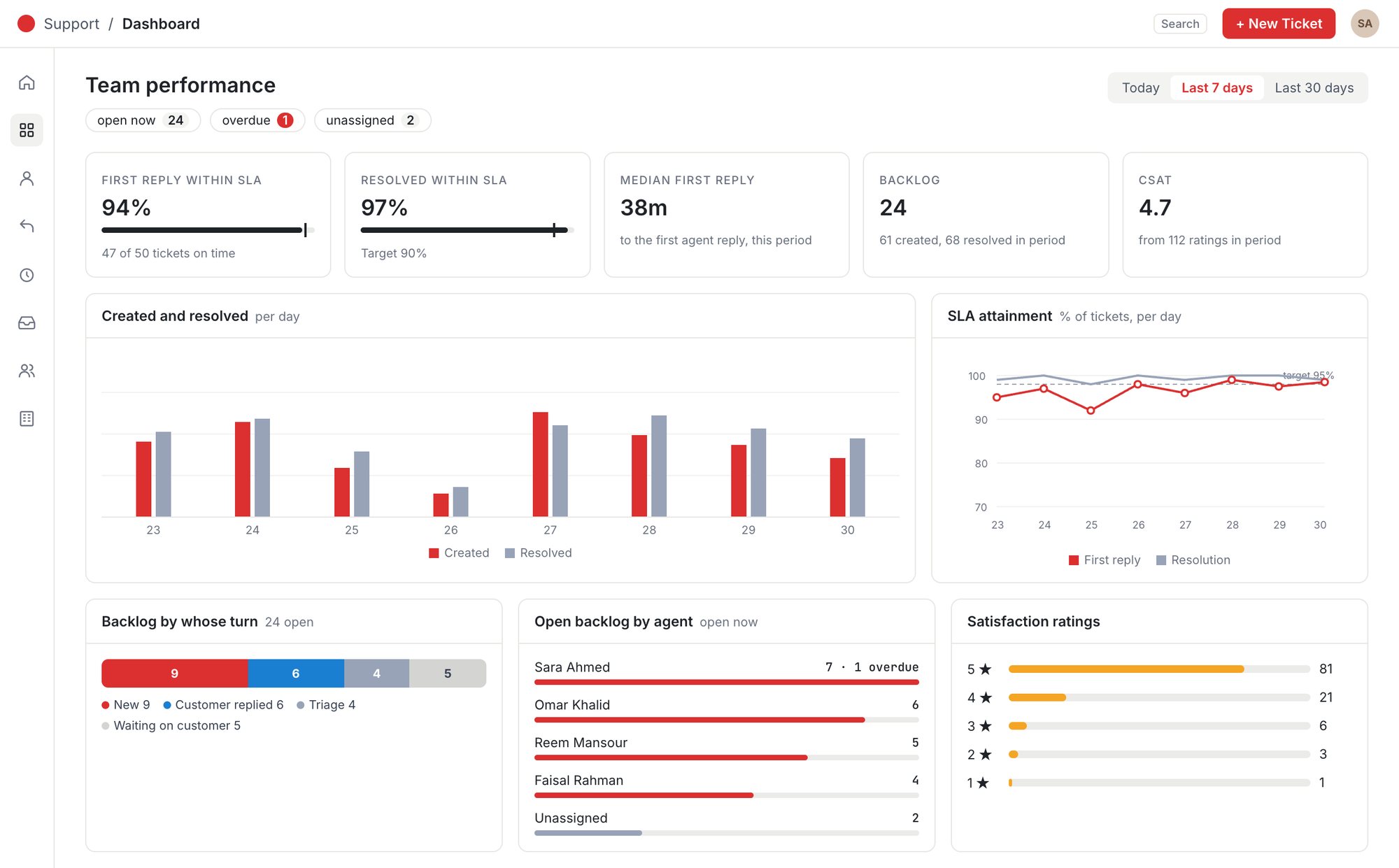
  • Live SLA, backlog and satisfaction dashboards
The HAL Support Desk team performance dashboard: first reply and resolution within SLA, median first reply, backlog, satisfaction score, created and resolved per day, SLA attainment and backlog by agent (sample data).
Ask Hala
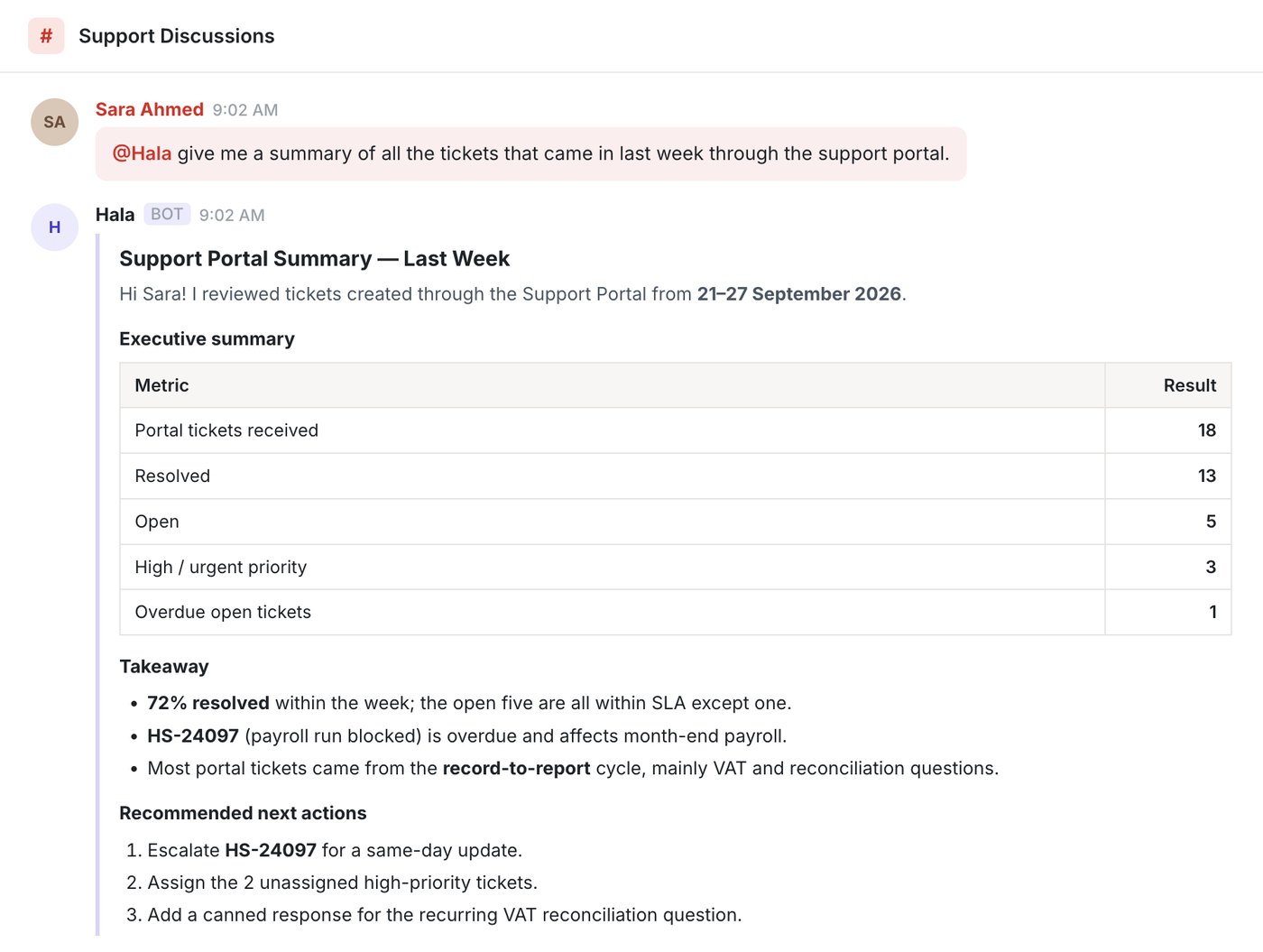
Hala answering a request for last week's support-portal tickets with an executive summary, takeaways and recommended next actions.
Why teams switch

Help that arrives on time, every time

The goal is simple: customers who get the help they need, and a team that sees trouble coming before the customer has to chase.

Happier customers

Customers raise tickets from wherever they are and follow every reply to closure, without chasing your team.

Closed on time

SLA clocks, business hours and early warnings keep every ticket moving toward its deadline.

Your brand, your voice

AI does the legwork; a person approves what goes out. Nothing reaches a customer that your team hasn't seen.

Hala AI

Ask your support desk anything

No reports to build. Ask Hala in plain language and get the numbers, the tickets behind them and what to do next.

How many tickets are overdue?Summarise last week's portal ticketsWhich customers are waiting on us?Who has the heaviest workload?
  • Key stats in secondsReceived, resolved, open, urgent and overdue, for any period or channel.
  • Takeaways, not just tablesHala points out the tickets that matter, even when their priority was set too low.
  • Recommended next actionsEscalations, assignments and fixes, ready for a lead to approve.
Hala's reply to a request for last week's portal tickets: an executive summary table, a takeaway and three recommended next actions.
Sample data shown.
AI with a human in the loop

Smart where it helps, human where it matters

Hala handles the repetitive work so your agents can spend their time on the customer.

Smart responses

Hala drafts a reply from the ticket and its history. Your agent edits, approves and sends.

Canned responses

A shared library of approved answers keeps replies fast and on-brand across the team.

Smart monitoring

SLA clocks and business hours flag tickets that are overdue, about to breach or waiting on your reply.

Intelligent delegation

Hala suggests the right owner and priority for each ticket. A lead confirms the assignment.

Built-in automation

Route new tickets to the least-busy agent or a fixed owner, and move tickets through status with one click.

Satisfaction surveys

Ask for a rating when a ticket closes and see how customers feel about the help they got.

1Hala suggests→2Your team reviews→3A person approves→4The customer gets help, on time
One inbox

Every channel, one queue

Tickets arrive the way your customers prefer to ask, and land in the same inbox with the same rules.
  • In-app support buttonCustomers raise a ticket from any screen in HAL ERP, with their name and email filled in.
  • Customer portalPasswordless sign-in with a one-time link, so customers can raise and track every ticket.
  • Email to ticketEvery message to your support address becomes a tracked ticket.
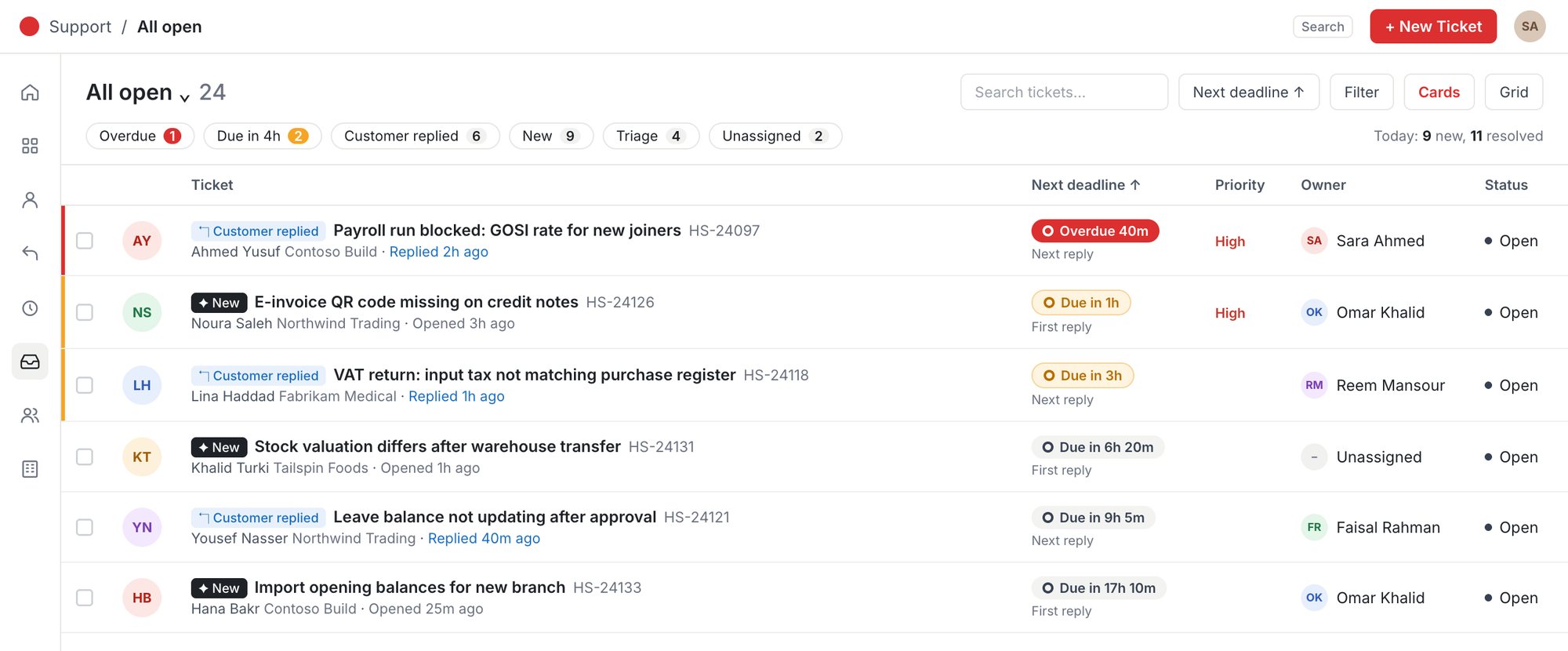
  • Find anything fastFilters, card and grid views, export, and instant search across every ticket, contact and company.
The Support Desk inbox: all open tickets with quick filters for overdue, due soon, customer replied, new, triage and unassigned, and each ticket's next deadline, priority, owner and status.
Sample data shown.
Every ticket

Work every ticket with the full picture

The conversation, the SLA clock and every detail sit side by side, so agents know what to do next and by when.
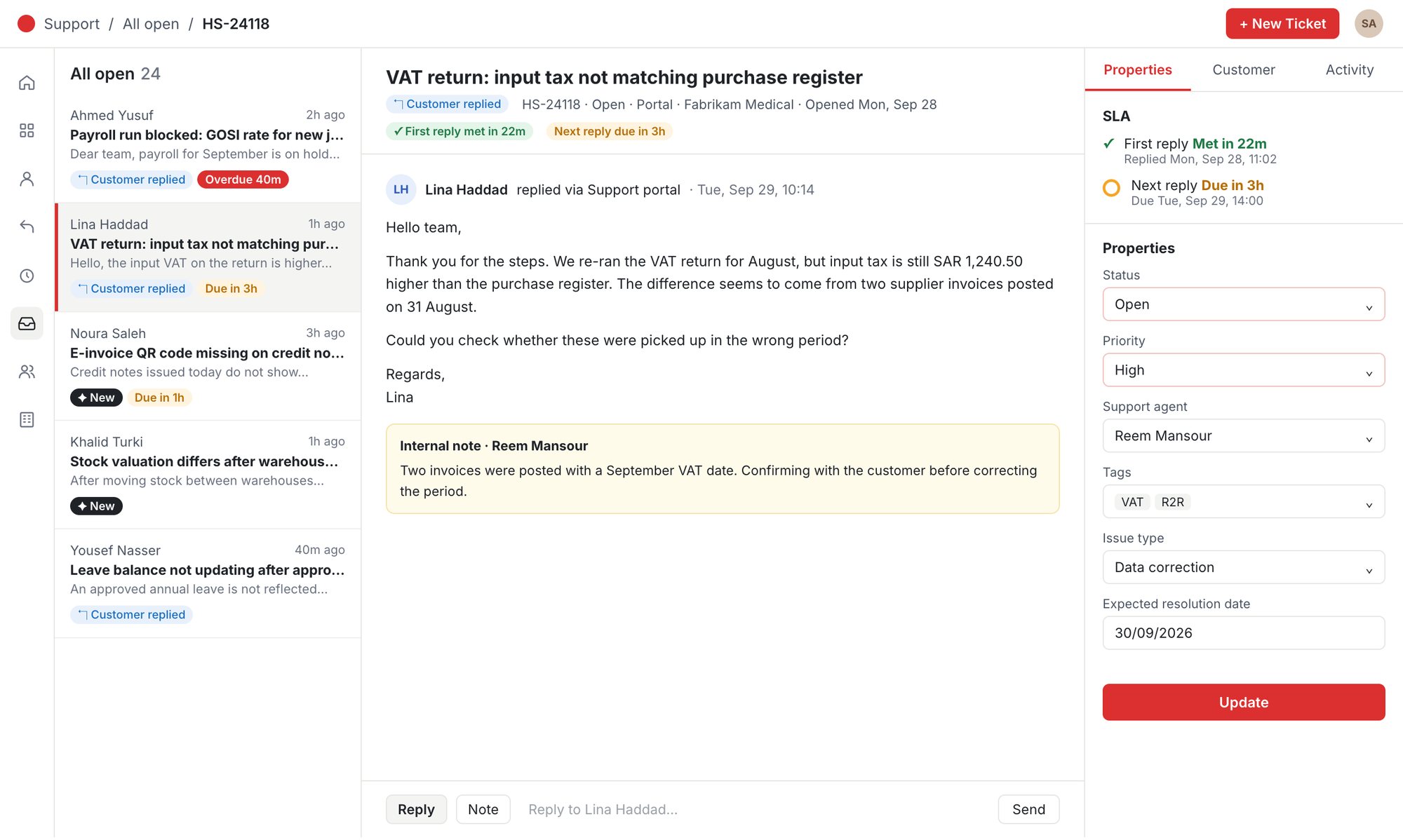
  • SLA clocks on every ticketFirst reply and next reply deadlines, met or due, right beside the conversation.
  • Replies and internal notesAnswer the customer or leave a note for the team in the same thread.
  • Everything in one panelStatus, priority, owner, tags, issue type and expected resolution date.
A ticket open in the Support Desk: the ticket list, the customer's message with an internal note, and a side panel with SLA status and ticket properties.
Sample data shown.
Web and mobile

A portal for your customers, an app for your team

Customer portal on any device

Customers sign in with a one-time link, see every ticket and reply in one place, from a laptop or a phone.
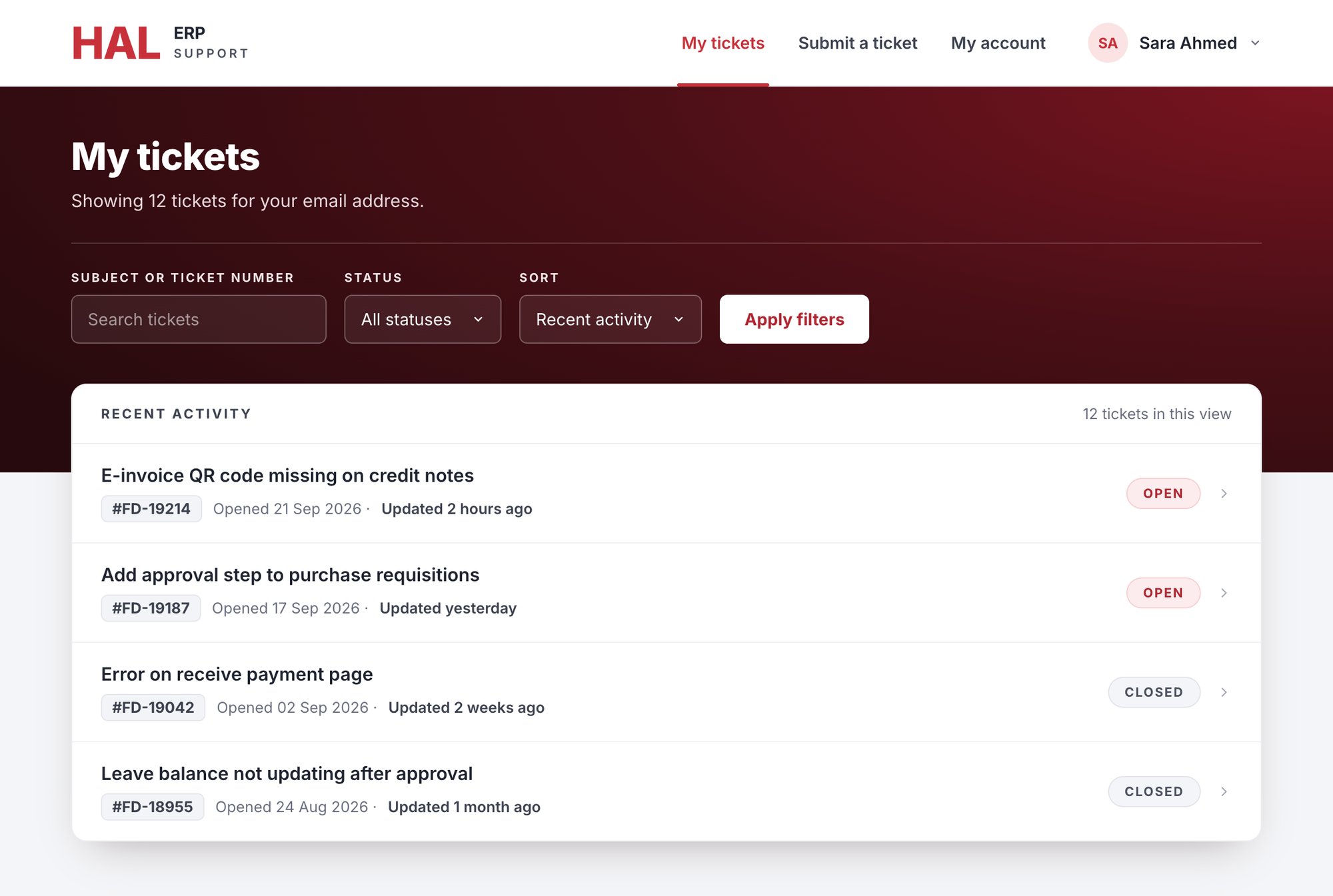
The customer portal: My tickets with search, status and sort filters, and open and closed tickets.

HAL Support app for admins

Review tickets and inbox activity and open tickets straight from notifications.
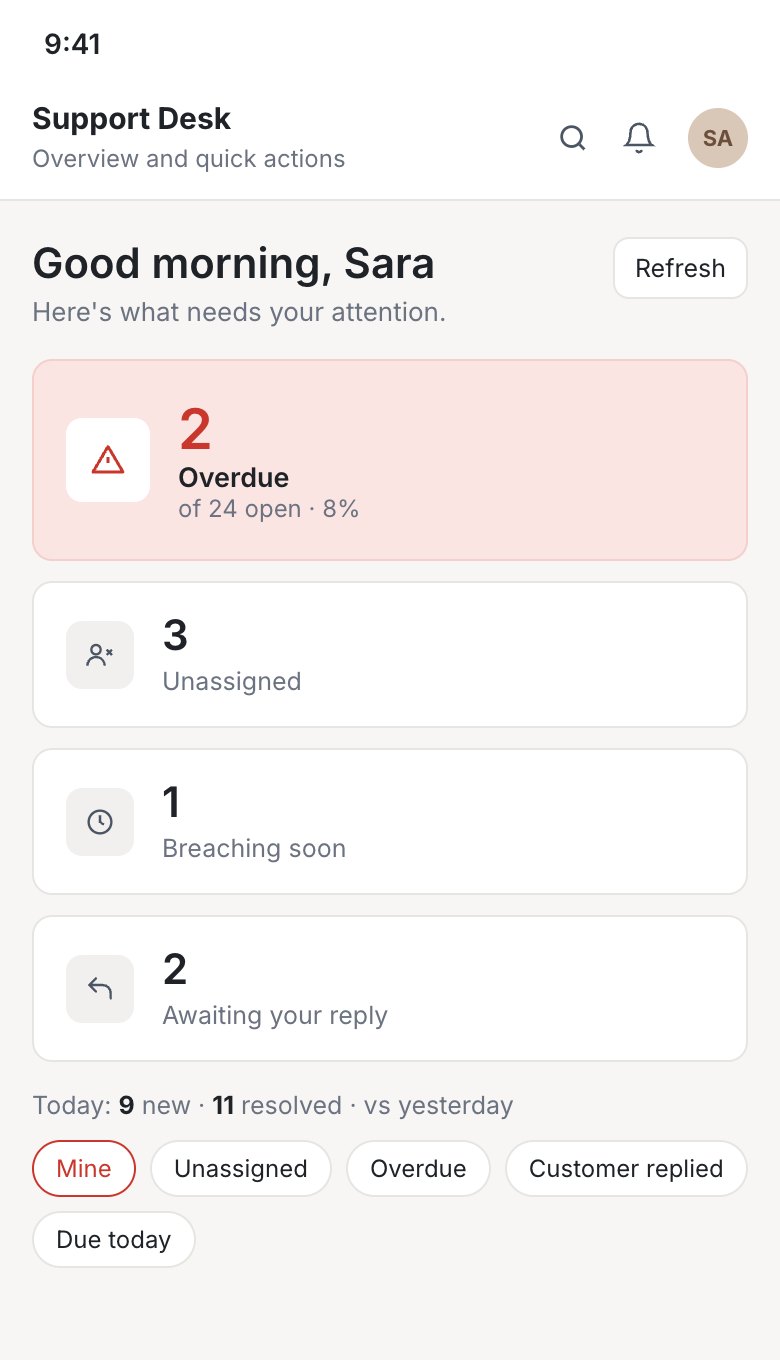
The HAL Support admin app showing overdue, unassigned, breaching-soon and awaiting-reply counts.
Get it on Google Play
Moving from another helpdesk?

Bring your ticket history with you

We moved our own customers from Freshdesk to HAL Support Desk with every ticket and conversation intact. Your team can start on day one with full context.

مكتب دعم HAL

مكتب الدعم المصمَّم لعصر الذكاء الاصطناعي

كل تذكرة، من داخل نظامك أو من بوابة العملاء أو من البريد الإلكتروني، تصل إلى مكتب واحد. يجيب مساعد Hala الذكي عن أسئلتك حول قائمة التذاكر، ويصوغ الردود، ويقترح من يتولى كل تذكرة، بينما يبقى فريقك متحكماً في كل كلمة تصل إلى عملائك.

  • اسأل Hala عن إحصاءات التذاكر بلغتك اليومية
  • ردود ذكية وجاهزة يعتمدها فريقك
  • مراقبة اتفاقيات مستوى الخدمة مع إشراف بشري
  • لوحات مباشرة لمستوى الخدمة والتذاكر المتراكمة ورضا العملاء
لوحة أداء الفريق في مكتب دعم HAL: الرد الأول والحل ضمن اتفاقية مستوى الخدمة، ومتوسط زمن الرد الأول، والتذاكر المتراكمة، ودرجة الرضا، والتذاكر المنشأة والمحلولة يومياً، وعبء كل موظف (بيانات توضيحية).
اسأل Hala
Hala يجيب عن طلب ملخص تذاكر بوابة الدعم للأسبوع الماضي بجدول ملخص وأبرز الملاحظات والإجراءات المقترحة.
لماذا تنتقل الفرق إلينا

مساعدة تصل في وقتها، في كل مرة

الهدف بسيط: عملاء يحصلون على المساعدة التي يحتاجونها، وفريق يرى المشكلة قبل أن يضطر العميل إلى المتابعة.

عملاء أكثر رضا

يرفع العملاء تذاكرهم من أي مكان، ويتابعون كل رد حتى الإغلاق دون الحاجة إلى ملاحقة فريقك.

إغلاق في الوقت المحدد

مؤقتات اتفاقيات مستوى الخدمة وساعات العمل والتنبيهات المبكرة تُبقي كل تذكرة في طريقها نحو موعدها.

علامتك التجارية وصوتك

يتولى الذكاء الاصطناعي العمل المتكرر، ويعتمد شخصٌ ما يُرسَل. لا يصل إلى العميل شيء لم يطّلع عليه فريقك.

Hala للذكاء الاصطناعي

اسأل مكتب الدعم عن أي شيء

لا حاجة إلى إعداد تقارير. اسأل Hala بلغتك اليومية واحصل على الأرقام والتذاكر التي خلفها والخطوة التالية.

كم عدد التذاكر المتأخرة؟لخّص تذاكر البوابة للأسبوع الماضيأي العملاء ينتظرون ردنا؟من لديه أكبر عبء عمل؟
  • إحصاءات رئيسية في ثوانٍالتذاكر الواردة والمحلولة والمفتوحة والعاجلة والمتأخرة، لأي فترة أو قناة.
  • خلاصات لا مجرد جداوليشير Hala إلى التذاكر المهمة، حتى إن حُدّدت أولويتها أقل من اللازم.
  • إجراءات مقترحةتصعيد وإسناد وتصحيحات جاهزة ليعتمدها المسؤول.
رد Hala على طلب ملخص تذاكر البوابة للأسبوع الماضي: جدول ملخص تنفيذي وخلاصة وثلاثة إجراءات مقترحة.
بيانات توضيحية.
ذكاء اصطناعي بإشراف بشري

ذكاء حيث يفيد، وإنسان حيث يهم

يتولى Hala العمل المتكرر ليتفرغ فريقك للعميل.

ردود ذكية

يصوغ Hala رداً من التذكرة وسجلها، ثم يعدّله موظف الدعم ويعتمده ويرسله.

ردود جاهزة

مكتبة مشتركة من الإجابات المعتمدة تُبقي الردود سريعة ومتسقة مع علامتك التجارية.

مراقبة ذكية

مؤقتات اتفاقيات مستوى الخدمة وساعات العمل تنبّه إلى التذاكر المتأخرة أو التي أوشكت مهلتها أو تنتظر ردك.

إسناد ذكي

يقترح Hala المسؤول المناسب والأولوية لكل تذكرة، ويؤكد قائد الفريق الإسناد.

أتمتة مدمجة

وجّه التذاكر الجديدة إلى الموظف الأقل انشغالاً أو إلى مسؤول ثابت، وانقل التذكرة بين الحالات بنقرة واحدة.

استبيانات الرضا

اطلب تقييماً عند إغلاق التذكرة واعرف شعور عملائك تجاه المساعدة التي تلقّوها.

1Hala يقترح→2فريقك يراجع→3شخصٌ يعتمد→4العميل يحصل على المساعدة في وقتها
صندوق وارد واحد

كل القنوات في قائمة واحدة

تصل التذاكر بالطريقة التي يفضّلها عملاؤك، وتدخل صندوق الوارد نفسه وتخضع للقواعد نفسها.

  • زر دعم داخل النظاميرفع العملاء تذكرة من أي شاشة في HAL ERP، مع تعبئة الاسم والبريد تلقائياً.
  • بوابة العملاءدخول دون كلمة مرور برابط لمرة واحدة، ليرفع العملاء تذاكرهم ويتابعوها.
  • من البريد إلى تذكرةكل رسالة إلى عنوان الدعم الخاص بك تصبح تذكرة قابلة للمتابعة.
  • اعثر على أي شيء بسرعةتصفية وعرض بالبطاقات أو الجدول وتصدير، وبحث فوري في كل التذاكر وجهات الاتصال والشركات.
صندوق الوارد في مكتب الدعم: كل التذاكر المفتوحة مع تصفية سريعة للمتأخرة والمستحقة قريباً وردود العملاء والجديدة وبانتظار الفرز وغير المُسندة، مع الموعد التالي والأولوية والمسؤول والحالة لكل تذكرة.
بيانات توضيحية.
كل تذكرة

تعامل مع كل تذكرة والصورة كاملة أمامك

المحادثة ومؤقت اتفاقية مستوى الخدمة وكل التفاصيل جنباً إلى جنب، ليعرف الموظف ما يجب فعله ومتى.

  • مؤقتات مستوى الخدمة في كل تذكرةمواعيد الرد الأول والرد التالي، المحققة أو المستحقة، بجانب المحادثة مباشرة.
  • ردود وملاحظات داخليةردّ على العميل أو اترك ملاحظة للفريق في المحادثة نفسها.
  • كل شيء في لوحة واحدةالحالة والأولوية والمسؤول والوسوم ونوع المشكلة وتاريخ الحل المتوقع.
تذكرة مفتوحة في مكتب الدعم: قائمة التذاكر، ورسالة العميل مع ملاحظة داخلية، ولوحة جانبية بحالة اتفاقية مستوى الخدمة وخصائص التذكرة.
بيانات توضيحية.
المتصفح والهاتف

بوابة لعملائك، وتطبيق لفريقك

بوابة العملاء على أي جهاز

يدخل العملاء برابط لمرة واحدة، ويرون كل تذكرة وكل رد في مكان واحد، من الحاسوب أو الهاتف.

بوابة العملاء: صفحة تذاكري مع البحث وتصفية الحالة والترتيب، وتذاكر مفتوحة ومغلقة.

تطبيق HAL Support للمسؤولين

راجع التذاكر ونشاط صندوق الوارد، وافتح التذاكر مباشرة من الإشعارات.

تطبيق HAL Support للمسؤولين يعرض أعداد التذاكر المتأخرة وغير المُسندة والتي أوشكت مهلتها وبانتظار الرد.
حمّله من Google Play
تنتقل من نظام دعم آخر؟

انقل سجل تذاكرك معك

نقلنا عملاءنا من Freshdesk إلى مكتب دعم HAL مع كل التذاكر والمحادثات كاملة. يبدأ فريقك من اليوم الأول بالسياق كاملاً.