ERP Implementation Life Cycle Explained: Phases & Best Practices
Published By
Mohammed Ali Khan
ERP
May 18, 2026
ERP implementation is one of those decisions where success isn’t obvious on day one. You can go live on schedule and still find, months later, that teams are struggling to use the system the way it was intended.
Processes feel slower instead of faster. Data is available, but not fully trusted. And small workarounds start creeping back into daily operations.
This is not a rare outcome. Research shows that a majority of ERP projects fail to meet their original objectives, with estimates up to 70%.
That tells you something important. The challenge is not deploying ERP. It is making it work in real operations.
That is exactly what the ERP implementation life cycle is meant to address. In this blog, you will understand the stages of the cycle, how each phase works in practice, and what it takes to implement ERP in a way that actually holds up after go-live.
Key Takeaways
The ERP implementation life cycle is a structured process where each phase directly impacts how smoothly the system works after go-live.
Early stages like system selection, planning, and gap analysis determine whether the ERP will align with real business operations or create friction later.
Success depends more on execution, leadership involvement, and user adoption than on the ERP software itself.
Data quality, testing, and training play a critical role in ensuring the system delivers accurate results and is actually used by teams.
A well-implemented ERP system improves control, visibility, and scalability, helping businesses manage growth without operational breakdowns.
What is the ERP Implementation Life Cycle?
ERP implementation is a structured, multi-phase process that ensures the smooth adoption and long-term success of an ERP system. It involves everything from system selection and customization to training employees and optimizing workflows.
For businesses in Saudi Arabia, ERP adoption must also align with ZATCA (Zakat, Tax, and Customs Authority) compliance and other regulatory requirements. Without a structured approach, ERP implementations often result in budget overruns, operational failures, and frustrated employees.
How Structured ERP Implementation Improves Business Outcomes
As said before, ERP systems are long-term investments. A lack of structured planning can result in budget overruns, operational disruptions, and failed adoption. By following a defined ERP implementation life cycle, CFOs and business owners can ensure a smooth transition and maximize ROI.
A well-structured ERP implementation life cycle provides multiple benefits:
Process Standardization: Streamlines operations across finance, supply chain, and HR.
Regulatory Compliance: Ensures adherence to Saudi tax regulations, including ZATCA compliance.
Improved Decision-Making: Provides real-time financial and operational insights.
Cost Savings: Prevents inefficiencies, reduces errors, and enhances ROI.
Scalability: Adapts to growing business needs and future expansions.
While the benefits are clear, ERP implementation is challenging. Let’s break down the stages of ERP implementation and how to navigate them effectively.
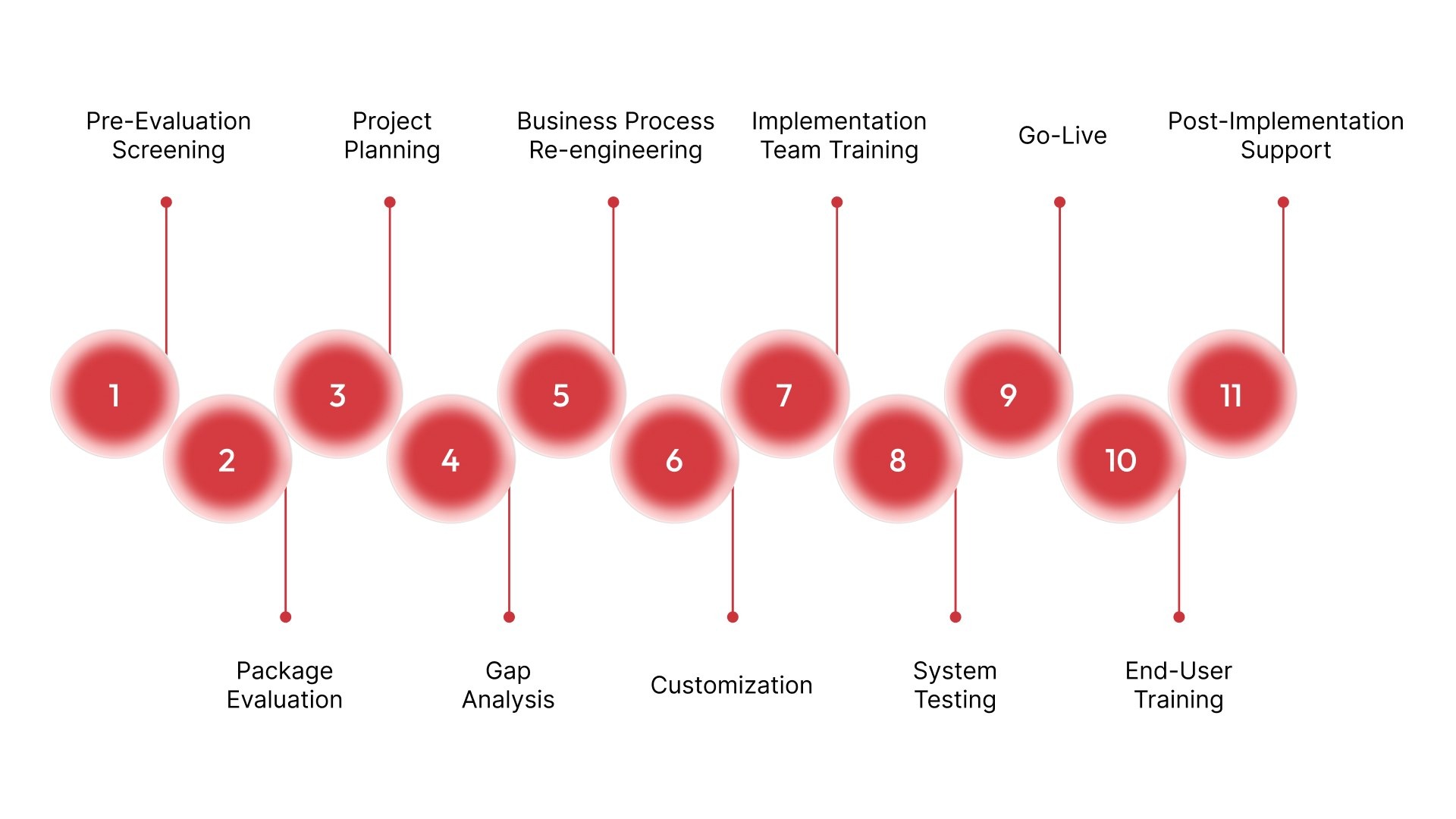
11 Phases of ERP Implementation Life Cycle
Breaking ERP implementation into phases helps you see where decisions carry long-term impact. Most delays, budget overruns, or adoption issues can be traced back to one of these phases being rushed or treated as a formality.
For mid-sized Saudi businesses, these phases are where operational reality meets system structure. The more complex your workflows, the more important it becomes to execute each phase with clarity and depth.
1. Pre-Evaluation Screening
This phase is about narrowing the field before any serious commitment is made. Businesses often underestimate how different ERP systems can be in terms of structure, flexibility, and industry alignment.
Clarify business priorities: Identify whether the focus is on financial control, inventory visibility, project tracking, compliance, or a combination of these.
Define operational scope early: Map out which departments, locations, and workflows must be covered in the first phase of implementation to avoid selecting a system that cannot scale with actual needs.
Shortlist industry-aligned solutions: Filter ERP systems based on how well they support your industry’s workflows, such as contracting, manufacturing, or trading, instead of choosing generic platforms.
Eliminate high-risk mismatches: Remove systems that require heavy customization for core processes, as this increases implementation time, cost, and long-term maintenance complexity.
2. Package Evaluation
Once the shortlist is ready, this phase focuses on making a grounded decision. It is not about finding a perfect system, but about choosing one that fits your operations with minimal compromise.
Evaluate real workflow fit: Test how each ERP handles actual business scenarios such as procurement cycles, approvals, inventory movement, and financial reporting.
Assess usability for teams: Ensure the system is intuitive enough for employees to use daily without excessive training or reliance on external support.
Review integration capability: Check how well the ERP connects with existing tools like POS systems, e-commerce platforms, or banking integrations.
Analyze total cost of ownership: Go beyond licensing costs and evaluate implementation, customization, training, and ongoing support expenses.
This phase translates the ERP decision into a structured execution plan. Without detailed planning, implementation quickly becomes reactive, with teams solving problems as they arise instead of following a defined path.
Create a phased implementation roadmap: Break the project into stages such as finance, procurement, and inventory rollout instead of attempting everything at once.
Define clear roles and accountability: Assign ownership for each module, process, and decision point to avoid confusion during execution.
Set realistic timelines and milestones: Align project timelines with business cycles to avoid disruption during peak operational periods.
Establish risk management protocols: Identify potential delays, data issues, or resource gaps early and define how they will be handled.
4. Gap Analysis
This is where the ERP system is tested against actual business operations. It reveals the difference between how the business currently works and how the system expects processes to run.
Map AS-IS vs TO-BE processes: Document existing workflows and compare them with ERP-supported workflows to identify gaps.
Prioritize high-impact gaps: Focus on areas that directly affect financial accuracy, compliance, or operational continuity.
Decide between adaptation and customization: Evaluate whether it is better to adjust business processes or modify the ERP system for each gap.
Quantify the impact of gaps: Assess how each gap affects cost, efficiency, or compliance to guide decision-making.
5. Business Process Re-engineering
ERP implementation is an opportunity to fix inefficiencies that have built up over time. Instead of replicating existing processes, this phase focuses on improving how work flows across the organization.
Eliminate redundant steps: Remove duplicate approvals, manual entries, and unnecessary handoffs that slow down operations.
Standardize workflows across teams: Ensure processes are consistent across departments or branches to improve coordination and reporting.
Align processes with system logic: Design workflows that fit naturally within the ERP structure to reduce dependency on workarounds.
Improve process transparency: Define clear start and end points for each process so teams know exactly how work progresses.
6. Customization
Customization bridges the remaining gaps between system capabilities and business requirements. It should be approached carefully to maintain system stability and scalability.
Configure modules to business needs: Adjust system settings for workflows, reporting formats, and approval structures.
Develop required extensions: Build additional features where standard ERP functionality does not meet operational requirements.
Maintain upgrade compatibility: Ensure customizations do not interfere with future system updates or enhancements.
Document all customizations: Keep detailed records of changes for easier maintenance and troubleshooting.
7. Implementation Team Training
This phase ensures that the core team responsible for implementation understands the system in depth. Without this, businesses remain dependent on external consultants for basic operations.
Train functional leads: Equip key team members with deep knowledge of specific modules such as finance, procurement, or HR.
Build internal expertise: Create a group of super users who can support others during and after implementation.
Align teams on workflows: Ensure all departments understand how processes will function in the new system.
Prepare for issue handling: Train teams to identify and resolve common system issues without delays.
8. System Testing
Testing ensures that the ERP system performs reliably under real operational conditions. It is designed to uncover issues before they affect business operations.
Conduct end-to-end workflow testing: Validate complete processes such as order-to-cash or procure-to-pay cycles.
Perform integration testing: Ensure all modules and external systems work together without data inconsistencies.
Run performance and stress tests: Evaluate system behavior under high transaction volumes or multiple concurrent users.
Validate data accuracy: Confirm that migrated data is correct and behaves as expected within the system.
9. Go-Live
This phase marks the transition from planning to actual usage. It is one of the most sensitive stages because it directly affects business continuity.
Execute controlled system switch: Move operations from legacy systems to ERP with minimal disruption.
Ensure operational readiness: Confirm that all critical processes, data, and users are prepared for live usage.
Monitor system performance closely: Track system behavior during initial operations to identify early issues.
Provide immediate support: Have teams ready to resolve problems quickly during the transition period.
10. End-User Training
After go-live, the focus shifts to ensuring employees can use the system effectively in their daily roles. Adoption is critical for long-term success.
Provide hands-on system exposure: Allow users to practice real tasks within the system to build confidence.
Support early-stage usage: Offer guidance and assistance during the initial adoption phase.
Track user proficiency: Monitor how effectively teams are using the system and address gaps.
11. Post-Implementation Support
ERP systems require ongoing attention after deployment. This phase ensures the system continues to perform effectively and evolve with the business.
Provide hypercare support: Offer intensive support immediately after go-live to stabilize operations.
Monitor system performance metrics: Track efficiency, system usage, and process effectiveness.
Implement continuous improvements: Adjust workflows, reports, and configurations based on real-world usage.
Plan for future scalability: Expand system capabilities as the business grows or new requirements emerge.
Even with a clear structure, not every implementation delivers results. The difference usually comes down to how these phases are executed.
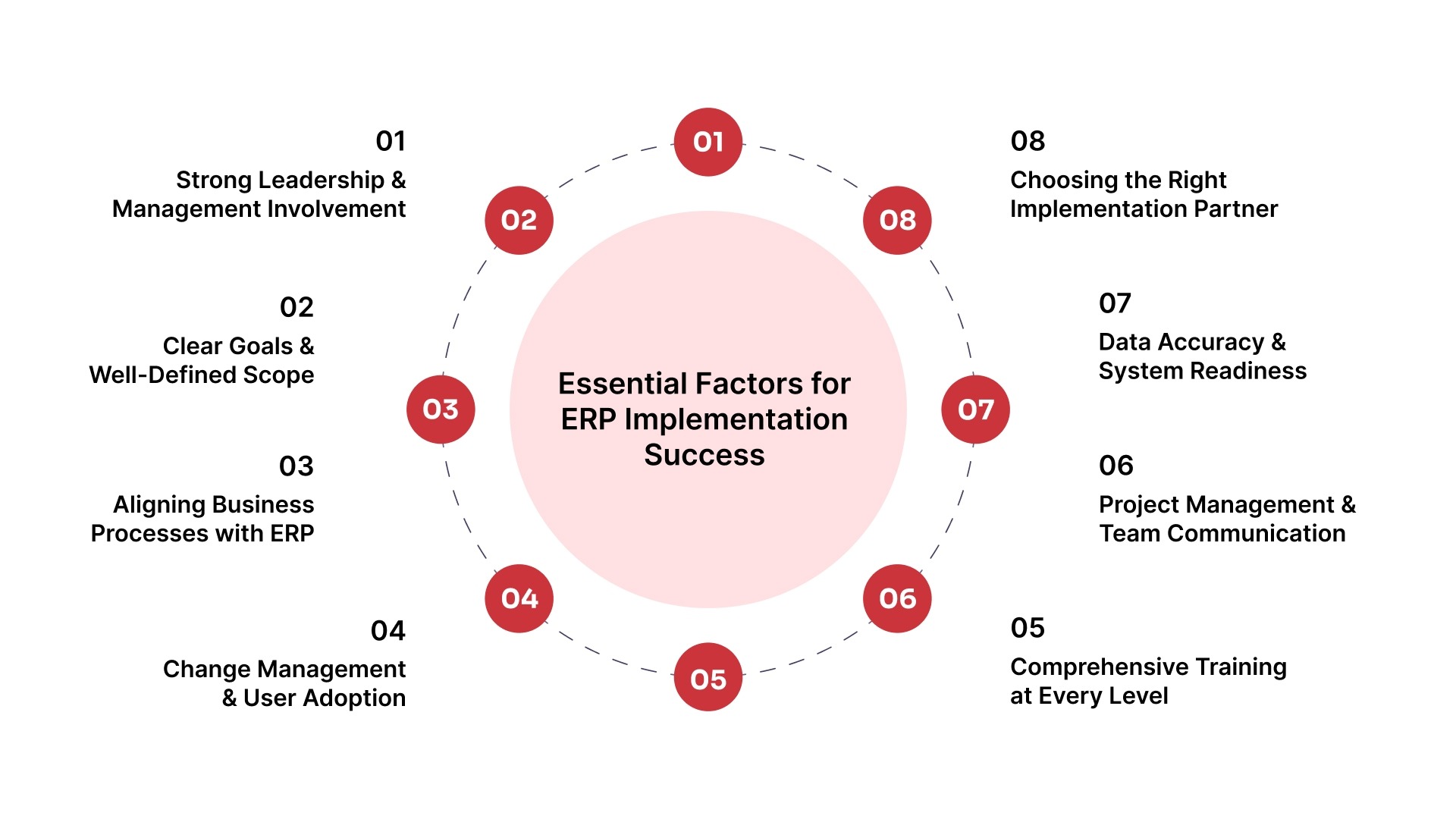
ERP implementation is shaped by how clearly the project is defined, how well teams align around it, and how consistently decisions are executed across the business. Many mid-sized companies invest in the right system but struggle to see results because the implementation lacks structure, ownership, or adoption at the ground level.
The factors below focus on the gaps that typically cause delays, resistance, or underutilization, and help ensure that ERP becomes a working system embedded into operations.
1. Strong Leadership and Management Involvement
ERP implementation needs consistent involvement from leadership throughout the project, not just at the approval stage. When leadership stays engaged, decisions are made faster, priorities remain clear, and teams stay aligned across departments.
Executive ownership of the project: Senior leadership must actively guide the implementation and treat it as a core business initiative rather than a technical upgrade.
Faster and clearer decision-making: Leadership involvement helps resolve conflicts, approve changes, and maintain momentum without unnecessary delays.
Consistent resource allocation: Management ensures that teams, budgets, and time are available when needed, preventing disruptions in the implementation process.
Cross-functional alignment: Active oversight keeps finance, operations, and procurement teams working toward the same objectives.
2. Clear Goals and Well-Defined Scope
ERP projects require clearly defined outcomes from the beginning. Without this clarity, businesses often expand the scope mid-way, which leads to delays, confusion, and increased costs.
Defined business objectives: Organizations must clearly outline what they want to achieve, such as improved reporting, better inventory control, or faster financial closing.
Controlled project scope: A well-defined scope prevents unnecessary additions during implementation and keeps the project focused on priority outcomes.
Alignment with operational priorities: The ERP system should directly support core business processes rather than introducing complexity that does not add value.
Realistic timelines and expectations: Setting achievable timelines helps maintain consistency and reduces pressure on teams during implementation.
3. Alignment Between Business Processes and the ERP System
ERP systems follow structured workflows, which means existing business processes must be aligned accordingly. If processes remain inconsistent or overly manual, the system will not deliver expected results.
Evaluation of current workflows: Businesses must assess how work is currently done and identify inefficiencies before implementing ERP.
Standardization across teams: Aligning processes across departments ensures consistency and improves coordination.
Reduction of workarounds: Instead of forcing the system to adapt to outdated processes, businesses should align workflows with ERP best practices.
Focus on long-term efficiency: Process improvements should prioritize scalability and sustainability rather than short-term convenience.
4. Effective Change Management and User Adoption
ERP implementation changes how employees perform their daily tasks. Without proper change management, teams may resist the system or use it incorrectly, reducing its effectiveness.
Early communication of changes: Employees should understand what is changing and how it affects their roles before the system is implemented.
Addressing resistance proactively: Concerns and challenges should be identified early to avoid disruption during implementation.
Clear role definition within the system: Each user must understand their responsibilities and how they interact with the ERP system.
Continuous monitoring of adoption: Businesses should track how effectively teams are using the system and provide support where needed.
5. Comprehensive Training at Every Level
Training plays a critical role in ensuring that employees can use the ERP system confidently and accurately. Without proper training, even a well-implemented system can fail to deliver value.
Role-based training programs: Training should be tailored to specific roles, ensuring that each user understands the functions relevant to their responsibilities.
Hands-on system practice: Employees should be given practical exposure to real workflows so they can apply their knowledge effectively.
Ongoing support after go-live: Training should continue beyond implementation to address new challenges and improve efficiency.
Development of internal experts: Creating a group of trained internal users helps provide quick support and reduces reliance on external consultants.
6. Strong Project Management and Communication
ERP implementation involves multiple teams and dependencies, making structured project management essential. Without it, coordination gaps can lead to delays and inefficiencies.
Dedicated project leadership: A structured project management team ensures accountability and tracks progress throughout implementation.
Clear communication channels: Regular updates and structured communication help keep all stakeholders informed and aligned.
Frequent progress reviews: Monitoring milestones helps identify issues early and allows timely corrective actions.
Defined escalation processes: Clear procedures for handling issues ensure that problems are resolved quickly without affecting timelines.
7. Data Accuracy and System Readiness
Data is the foundation of any ERP system. If the data is inaccurate or incomplete, the system will produce unreliable results, affecting decision-making and operations.
Data cleansing before migration: Existing data should be reviewed, cleaned, and standardized before being transferred to the ERP system.
Validation of data integrity: Businesses must ensure that financial, inventory, and operational data are accurate and consistent.
Alignment with system structure: Data formats and structures should match ERP requirements to avoid processing errors.
Ongoing data governance: Maintaining data accuracy after implementation ensures long-term system reliability.
8. Choosing the Right Implementation Partner
The implementation partner plays a critical role in guiding the process and ensuring that the system is configured correctly. The right partner reduces risk and improves the chances of success.
Industry-specific expertise: The partner should understand the operational challenges of your industry to provide relevant solutions.
Structured implementation methodology: A clear approach to each phase ensures consistency and reduces uncertainty during execution.
Support beyond implementation: Ongoing assistance helps businesses optimize the system and adapt to changes over time.
Balanced customization approach: The partner should avoid unnecessary complexity while ensuring the system meets business requirements.
HAL ERP offers customized, ZATCA-compliant solutions with seamless integration and end-to-end support. Here’s why you should choose HAL.
Simplify ERP Implementation with HAL ERP
ERP implementation often fails when businesses try to force operations into rigid systems that are difficult to adapt, expensive to maintain, and slow to deploy. HAL is built differently for growing Saudi businesses that need faster implementation, operational flexibility, and local compliance readiness without long deployment cycles.
With HAL ERP, businesses can:
Go live faster with structured implementation timelines and dedicated transition support.
Centralize finance, procurement, HR, inventory, payroll, and operations in one connected platform.
Customize workflows, approvals, and reporting around actual business operations.
Support VAT and ZATCA-compliant financial workflows from day one.
Easily integrate your existing systems with procurement, inventory, projects, payroll, and finance without disconnected systems.
Want to see how HAL ERP has transformed businesses? Check out our success stories to learn how companies have achieved their goals with our ERP solutions.
Conclusion
ERP implementation is a structured transition that shapes how your business will operate for years.
When each stage is handled with clarity, the system supports your workflows instead of disrupting them. When it is rushed or fragmented, the problems show up long after go-live. The difference comes down to structure, execution, and the right support.
HAL ERP is built to simplify this journey with faster implementation timelines, dedicated transition teams, and built-in compliance for Saudi businesses.
Book a demo with HAL ERP to see how your ERP implementation can move from complexity to control.
FAQs
1. Why do employees resist ERP implementation even when the system is better?
Resistance usually happens when teams feel workflows are changing without enough training, communication, or clarity on how the ERP will improve their daily work.
2. Can ERP implementation disrupt daily business operations?
Yes, poorly planned implementations can slow approvals, reporting, procurement, or finance workflows temporarily, which is why phased rollouts and testing are important.
3. What causes ERP implementation timelines to get delayed?
Delays often happen because of unclear requirements, excessive customization requests, poor data preparation, or slow decision-making during implementation.
4. How much data should businesses clean before ERP migration?
Businesses should clean outdated, duplicate, and inaccurate records before migration because poor data quality creates reporting and operational issues after go-live.
5. Why do some ERP systems fail after successful deployment?
Many ERP projects fail after launch because businesses focus only on technical implementation and overlook user adoption, process alignment, and post-go-live support.
6. Is it risky to customize ERP workflows heavily?
Yes. Heavy customization can increase implementation complexity, slow future upgrades, and create long-term maintenance challenges if not managed carefully.
7. What departments should be involved during ERP implementation?
ERP implementation should involve finance, procurement, operations, HR, inventory, IT, and leadership teams to ensure workflows align across the business.
8. How do businesses know if their ERP processes are poorly configured?
Frequent manual workarounds, duplicate data entry, reporting inconsistencies, and employee frustration are common signs of weak ERP configuration.
9. Why is post-go-live support important after ERP implementation?
Most operational issues appear after teams begin using the system daily, making post-go-live support critical for resolving gaps and improving adoption.
10. How can businesses reduce ERP implementation risk?
Businesses reduce implementation risk through clear planning, realistic timelines, phased rollouts, proper testing, employee training, and strong implementation support.
Mohammed Ali Khan
Mohammed Ali Khan is a seasoned ERP Implementation Consultant with over 100 successful projects across Saudi Arabia. With expertise across diverse industries, he has spearheaded large-scale implementations for customers across the Construction/Contracting and Retail industry to name a few. He is fluent with regional challenges and Saudi-specific compliance requirements