![تقرير خط أنابيب مبيعات نظام إدارة علاقات العملاء (CRM): العناصر الأساسية، المقاييس، وأفضل الممارسات [دليل 2026]](https://cdn.prod.website-files.com/65032fc858c35fbe3342e4ed/69d338fb7c9991f904439444_CRM%20Sales%20Pipeline%20Report.jpg)

هل فريق المبيعات لديك يُغلق الصفقات أم يكتفي بتتبعها فقط؟ إذا كان التنبؤ يبدو أشبه بالتخمين، فقد يكون تقرير خط أنابيب المبيعات في نظام إدارة علاقات العملاء (CRM) هو القطعة المفقودة.
في عام 2025، قُدّرت قيمة سوق أنظمة إدارة علاقات العملاء (CRM) في السعودية بـ 713.8 مليون دولار أمريكي، ومن المتوقع أن ينمو بمعدل نمو سنوي مركب قدره 8.93% حتى عام 2034. وعلى الرغم من الاستثمارات الكبيرة في أدوات CRM، لا تزال العديد من الشركات المتوسطة في المملكة العربية السعودية تعاني من بيانات خط أنابيب قديمة، وتحديثات يدوية، وتوقعات غير دقيقة.
بالنسبة لقادة المبيعات، والمؤسسين، ومديري العمليات في المملكة، يُعد هذا تحديًا تشغيليًا حقيقيًا. الصفقات تتعثر، وأهداف الإيرادات لا تتحقق، والقرارات تُتخذ بناءً على الحدس بدلًا من البيانات الحية.
تستعرض هذه المدونة كيفية بناء واستخدام تقارير خط أنابيب مبيعات CRM بشكل فعّال، مع أفضل الممارسات المصممة خصيصًا للشركات العاملة في المملكة العربية السعودية.
يوفر تقرير خط أنابيب المبيعات في نظام إدارة علاقات العملاء (CRM) رؤية فورية لمراحل الصفقات، والمخاطر، والإيرادات المتوقعة، مما يساعد الفرق على الانتقال من التخمين إلى اتخاذ قرارات مبنية على البيانات.
إن فهم الفرق بين تقارير خط الأنابيب وتوقعات المبيعات أمر بالغ الأهمية لتجنب المبالغة في تقدير الإيرادات وتفويت الأهداف.
إن تتبع المقاييس الصحيحة، مثل تغطية خط الأنابيب، ومعدل الفوز، وسرعة المبيعات، يؤثر بشكل مباشر على قابلية التنبؤ بالإيرادات وأداء الفريق.
يجب على الشركات في المملكة العربية السعودية (KSA) تكييف هياكل خط الأنابيب مع دورات الصفقات الطويلة، والمبيعات المعتمدة على العلاقات، وقطاعات النمو في رؤية 2030.
تقوم منصة HAL ERP بدمج بيانات المبيعات والمالية في منصة واحدة، مما يلغي عزلة البيانات ويتيح تقارير خط أنابيب دقيقة ومؤتمتة.
تقرير خط أنابيب المبيعات في نظام إدارة علاقات العملاء (CRM) هو عرض منظم لكل صفقة نشطة في عملية المبيعات الخاصة بك. يُظهر موقع كل صفقة، ومن يملكها، وقيمتها، واحتمالية إغلاقها.
إنه فحص صحي مباشر للإيرادات. ويجيب عن ثلاثة أسئلة في لمحة:
أين توجد صفقاتنا الآن؟
أي منها متعثر أو معرض للخطر؟
ما هي الإيرادات التي يمكننا توقعها بشكل واقعي هذا الربع؟
على عكس قائمة بسيطة من العملاء المحتملين، يربط تقرير خط الأنابيب بين نشاط الصفقات، وتقدم المراحل، وقيمة الصفقة، واحتمالية الإغلاق في عرض واحد يمكن لفريق القيادة العمل عليه فعليًا.
حتى الفرق البيعية المنظمة جيدًا غالبًا ما تخلط بين الرؤية والتنبؤ. لاستخدام بيانات CRM بفعالية، يجب فصل ما يُظهره خط الأنابيب عما يفترضه التنبؤ.
يُظهر تقرير خط الأنابيب ما هو موجود في القمع البيعي الآن. أما التوقعات فتُظهر ما من المرجح أن يُغلق في تاريخ معين. خلطهما يؤدي إلى أهداف مفرطة التفاؤل أو محادثات إيرادات مفقودة.
الفكرة الأساسية هنا هي أن دقة التوقع تعتمد فقط على جودة بيانات خط الأنابيب التي تغذّيه. إذا كان تقرير خط الأنابيب لديك غير منظم، فستكون توقعاتك خاطئة، بغض النظر عن مدى جودة نموذج التنبؤ الذي تستخدمه.
الشركات التي تستخدم نظام ERP مثل HAL ERP، والذي يغطي المبيعات والمالية في منصة واحدة، تتمتع بميزة طبيعية في هذا المجال. إذ إن بيانات المبيعات والبيانات المالية موجودة في نفس النظام، مما يعني أخطاء تسوية أقل وتقارير أدق في كل مرحلة.
خط الأنابيب لا يكون مفيدًا إلا بقدر جودة المراحل التي يُبنى عليها. إذا كانت مراحلك غير واضحة أو غير متسقة، فإن تقاريرك ستعكس هذا الارتباك.
كل خط أنابيب مبيعات فريد من نوعه، لكن معظمها يتبع هيكلًا أساسيًا. إليك ما تعنيه كل مرحلة ولماذا هي مهمة.
توليد العملاء المحتملين / التنقيب: هنا تدخل الفرص الجديدة إلى خط الأنابيب. سواء جاءت من التسويق الداخلي، أو الإحالات، أو المكالمات الخارجية، فإن كل صفقة تبدأ من هنا. الهدف هو الحجم، لكن الجودة أهم.
تأهيل العملاء المحتملين: في هذه المرحلة، يتم تقييم ما إذا كان العميل المحتمل يستحق المتابعة. استخدم إطار عمل مثل BANT (الميزانية، السلطة، الحاجة، الإطار الزمني) لتصفية العملاء غير المناسبين بسرعة قبل أن يضيعوا وقت فريقك.
مرحلة العرض / التسعير: يكون فريقك قد أعد وأرسل عرضًا. غالبًا ما تستغرق هذه المرحلة وقتًا أطول في المملكة العربية السعودية بسبب الحاجة إلى موافقات متعددة من أصحاب القرار. يجب تتبع الوقت في هذه المرحلة بدقة.
التفاوض والالتزام: يتم مناقشة الشروط. هنا يكون بناء العلاقات هو الأهم في السوق السعودي. الصفقات هنا تكون دافئة لكنها لم تُحسم بعد. يجب أن يقوم نظام CRM لديك بتنبيه الصفقات التي تبقى في هذه المرحلة لفترة طويلة.
تم الإغلاق (فوز / خسارة): للصفقة نتيجة نهائية. الصفقات الخاسرة لا تقل أهمية عن الناجحة في التتبع. فهي تكشف أنماطًا: أي الصناعات تنسحب، أي المنافسين يفوزون ضدك، وأين تتعطل عمليتك.
اقرأ أيضًا: نظام تخطيط موارد المؤسسة (ERP) مقابل إدارة علاقات العملاء (CRM): فهم الفروقات الرئيسية لعملك
مع وجود خط أنابيب مُنظم، يصبح التحدي التالي هو الرؤية.

ليست كل تقارير خط الأنابيب تخدم نفس الغرض. إليك ستة أنواع مهمة يجب معرفتها.
تقرير خط الأنابيب حسب المرحلة: يُظهر عدد الصفقات الموجودة في كل مرحلة وإجمالي قيمتها. هذا هو تقريرك الأساسي. يتم تشغيله أسبوعيًا لاكتشاف الاختلالات، مثل تراكم غير طبيعي في مرحلة العروض دون حركة.
تقرير أداء مندوبي المبيعات: يجزّئ نشاط خط الأنابيب حسب كل مندوب مبيعات: الصفقات التي يديرها، توزيع المراحل، معدلات الفوز، ومتوسط حجم الصفقة. يُستخدم في الاجتماعات الفردية للتوجيه والتدريب، وليس للرقابة المفرطة.
تقرير تغطية خط الأنابيب: يقارن قيمة خط الأنابيب بهدف الإيرادات لديك. عادة ما تكون نسبة التغطية الصحية بين 3x و4x من الحصة المستهدفة. إذا انخفضت عن 2x، فالمشكلة ليست في الإغلاق بل في خط الأنابيب نفسه.
تقرير التوقعات: يطبق احتمالية الفوز على كل صفقة ويعطي رقمًا متوقعًا للإيرادات. يُستخدم جنبًا إلى جنب مع تقرير خط الأنابيب لاكتشاف الفجوة بين ما يتوقعه الفريق وما تدعمه البيانات فعليًا.
تقرير الصفقات المتوقفة: يكشف الصفقات التي لم تتقدم خلال عدد محدد من الأيام. هذا من أكثر التقارير قيمة لمديري المبيعات، لأن الصفقات المتوقفة تعني إيرادات غير مستغلة.
تقرير مصدر العملاء المحتملين: يُظهر القنوات التي تنتج أكثر الصفقات قيمة، مثل الإحالات، الفعاليات، الإعلانات الرقمية، أو التواصل المباشر. في المملكة العربية السعودية، غالبًا ما تتفوق الإحالات والتواصل المباشر على القنوات الرقمية بشكل ملحوظ.
معرفة التقارير التي يجب استخدامها ليست سوى نصف المعادلة. القيمة الحقيقية تأتي من ما تختاره لتتبعه داخل هذه التقارير.

لا يكون تقرير خط أنابيب المبيعات الجيد مجرد قائمة صفقات، بل هو عرض منظم يروي قصة الإيرادات لديك. إليك ما يجب تضمينه.
مراحل خط الأنابيب: اجعلها واضحة ومحدودة: استخدم بين 4 و7 مراحل. أكثر من ذلك يؤدي إلى ارتباك وعدم اتساق في إدخال البيانات. يجب أن تكون لكل مرحلة معايير خروج واضحة حتى يعرف المندوبون متى يتم نقل الصفقة إلى المرحلة التالية.
تتبع العملاء المحتملين وملكية الصفقات: يجب أن تكون لكل صفقة جهة مالكة محددة. الملكية المشتركة تؤدي إلى عدم وجود مسؤولية حقيقية. يجب أن يلتقط نظام CRM أيضًا مصدر العميل المحتمل لتتمكن من تتبع كل صفقة إلى أصلها.
قيمة الصفقة (الفعلية مقابل المرجحة): القيمة الفعلية هي إجمالي قيمة العقد. أما القيمة المرجحة فتطبق احتمال الفوز لإعطاء صورة أكثر واقعية عن الإيرادات. يجب عرض كلاهما: الفعلية تُظهر الحد الأعلى، والمرجحة تُظهر الحد الأدنى.
تتبع النشاط: المكالمات، الرسائل، العروض التقديمية: لا تكتفِ بتتبع مراحل الصفقات، بل تتبع ما يقوم به المندوبون فعليًا. انخفاض النشاط في صفقة في مرحلة متقدمة يُعد علامة تحذير. يجب أن يكشف نظام CRM ذلك تلقائيًا.
عمر الصفقة والوقت في المرحلة: كم من الوقت بقيت الصفقة في خط الأنابيب؟ وكم من الوقت بقيت في مرحلة معينة؟ هاتان المقياسان يكشفان ما إذا كانت المشكلة في العملية أو في صفقة فردية.
احتمالية الإغلاق وتاريخ الإغلاق المتوقع: يجب أن يحدد المندوبون هذه الحقول، لكن على المديرين التحقق من منطقيتها. صفقة تُسجل بنسبة 90% إغلاق خلال الأسبوع القادم دون أي نشاط خلال 30 يومًا ليست صفقة 90%.
ملاحظات وحقول السياق: الحقول النصية الحرة تسمح للمندوبين بتسجيل تفاصيل لا تعكسها الأرقام. في المملكة العربية السعودية، حيث يعتمد اتخاذ القرار غالبًا على العلاقات وقنوات غير رسمية، تعتبر هذه الملاحظات مهمة جدًا.
بعد أن تصبح البنية والبيانات جاهزة، ينتقل التركيز إلى التنفيذ.
اقرأ أيضًا: 13 سببًا لارتفاع مبيعاتك بشكل كبير باستخدام نظام CRM المناسب
في السوق السعودي، يصبح تنفيذ تقرير خط أنابيب المبيعات في CRM أكثر أهمية. فطول دورات الصفقات، واعتماد المبيعات على العلاقات، وتعدد الكيانات التشغيلية، كلها عوامل تضيف مستوى من التعقيد لا يمكن للتطبيقات الأساسية لخط الأنابيب التعامل معه.
تم تصميم الممارسات التالية خصيصًا لشركات المملكة العربية السعودية العاملة في هذا البيئة، حيث تؤثر الدقة، والاتساق، والرؤية المباشرة بشكل كبير على نتائج الإيرادات.
تبسيط وتوحيد مراحل خط الأنابيب:
وحّد أسماء المراحل عبر كامل الفريق. إذا كان أحد المندوبين يستخدم "إرسال عرض" وآخر يستخدم "مرحلة التسعير"، فإن تقاريرك تصبح بلا معنى. الاتساق في التسمية أهم من تعقيد الهيكل.
إعطاء الأولوية لجودة البيانات على تعقيد النظام:
النظام المؤسسي ببيانات غير نظيفة أسوأ من نظام بسيط ببيانات دقيقة. ابنِ عادات بيانات جيدة قبل إضافة الميزات. قم بمراجعة خط الأنابيب مرة كل ربع سنة على الأقل لإزالة التكرارات، وإغلاق الصفقات الميتة، وتصحيح الحقول الناقصة.
استخدام الأتمتة لإلغاء التحديثات اليدوية:
كل خطوة يدوية هي فرصة للخطأ أو التأخير. حيثما أمكن، قم بأتمتة انتقالات المراحل بناءً على محفزات النشاط. إذا لم يتم تسجيل أي نشاط خلال 14 يومًا، يتم تمييز الصفقة للمراجعة تلقائيًا بدل الاعتماد على المندوبين في التحديث الذاتي.
عقد اجتماع أسبوعي لمراجعة خط أنابيب المبيعات:
يُعد اجتماع المراجعة الأسبوعي المنظم أحد أعلى العادات تأثيرًا التي يمكن لفريق المبيعات بناؤها.
جدول أعمال مراجعة خط الأنابيب (30 دقيقة):
التقارير المطلوبة قبل الاجتماع:
تقرير المراحل، تقرير الصفقات المتوقفة، تقرير أداء المندوبين، تقرير التوقعات
علامات الخطر التي يجب مراقبتها:
صفقات عمرها أكثر من 60 يومًا، عروض بلا متابعة، صفقات بدون تاريخ إغلاق متوقع، تغطية خط أنابيب أقل من 2x من الحصة
استخدام القيمة المرجحة لخط الأنابيب لتوقع أدق:
القيمة الإجمالية لخط الأنابيب دائمًا ما تبالغ في الإيرادات. الصفقة في مرحلة التأهيل ليست مساوية لصفقة في مرحلة التفاوض. يجب تطبيق احتمالات فوز واقعية لكل مرحلة وتحديثها بانتظام بناءً على معدلات الفوز الفعلية التاريخية.
تعمل رؤية السعودية 2030 على زيادة الطلب في قطاعات مثل السياحة، والترفيه، والرعاية الصحية، والخدمات اللوجستية. تقوم فرق المبيعات الذكية في المملكة العربية السعودية ببناء شرائح مخصصة لخطوط الأنابيب لهذه القطاعات سريعة النمو. إذا كان نظامك لا يتيح لك تصنيف الصفقات حسب الصناعة أو المبادرة، فأنت تفقد رؤية مهمة حول أسرع الفرص نموًا في المملكة.
إدارة الصفقات المعقدة وطويلة الدورة في السوق السعودي
غالبًا ما تتضمن صفقات المؤسسات في المملكة العربية السعودية فترات قرار طويلة، وعدة صناع قرار، وإجراءات شراء رسمية. لا يجب التعامل مع صفقة حكومية أو شبه حكومية بنفس طريقة صفقة B2B مباشرة. يجب بناء مراحل خط أنابيب منفصلة أو أنواع صفقات مختلفة للفرص طويلة الدورة، مع معايير مراحل تعكس الجداول الزمنية الواقعية في السوق السعودي.
الثقة، والدعم بعد البيع، وما يجب أن يعكسه خط الأنابيب
في السعودية، لا تنتهي العلاقة التجارية عند توقيع العقد. الدعم بعد البيع وإدارة العلاقة المستمرة يلعبان دورًا كبيرًا في الإحالات وتجديد العقود. يجب التفكير في إضافة مرحلة تسليم بعد البيع داخل خط الأنابيب حتى لا تضيع أي تفاصيل بين فرق المبيعات والتسليم.
إذا كانت شركتك تعمل عبر الرياض، وجدة، والدمام، أو مدن أخرى في دول مجلس التعاون الخليجي، فإن تقارير خط الأنابيب لديك يجب أن تكون قادرة على التجميع والتصفية حسب الفرع.
وهنا تحديدًا تحصل الشركات التي تستخدم نظام ERP منظمًا مع وحدة مبيعات، مثل HAL ERP، على ميزة حقيقية. إذ إن التقارير الموحدة متعددة المواقع تمنع احتساب الصفقات مرتين، وتداخل المناطق البيعية، وتجزؤ البيانات الناتج عن إدارة كل فرع بشكل مستقل.
اقرأ أيضًا: أفضل 5 منصات CRM تعتمد على الذكاء الاصطناعي الوكيلي (Agentic AI) التي تعيد تعريف تفاعل العملاء في عام 2026
بمجرد تطبيق هذه الممارسات، يتوقف خط الأنابيب لديك عن كونه تقريرًا ثابتًا ويبدأ بالعمل كنظام قرارات في الوقت الفعلي. الخطوة التالية هي معرفة المقاييس التي تهم فعلاً.
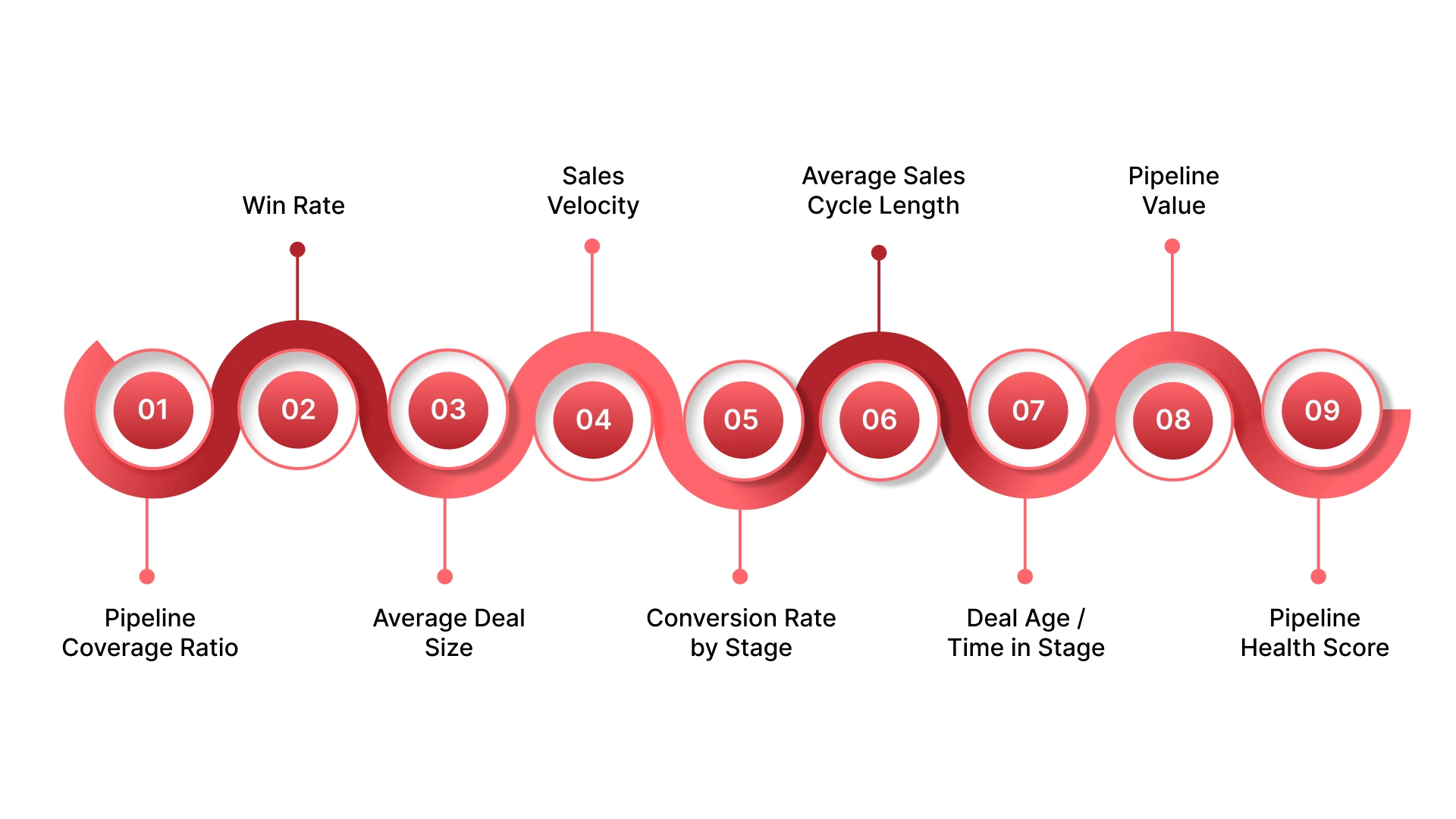
المقاييس التسعة في خط أنابيب المبيعات في CRM التي تهم فعلاً
المقاييس بدون سياق هي مجرد ضوضاء. إليك تسعة مقاييس تؤثر مباشرة على الإيرادات، وما الذي تخبرك به عن صحة خط الأنابيب لديك.
نسبة تغطية خط الأنابيب:
الصيغة: إجمالي قيمة خط الأنابيب / هدف الإيرادات.
المعيار الصحي: 3x إلى 4x من الحصة المستهدفة.
نسبة أقل من 2x تعني أن فريقك بحاجة إلى زيادة البحث عن العملاء المحتملين، وليس التركيز فقط على الإغلاق.
معدل الفوز:
النسبة المئوية للصفقات التي يتم إغلاقها من إجمالي الصفقات المدخلة.
يجب تتبعه حسب المندوب، والصناعة، ومصدر الصفقة. انخفاض معدل الفوز غالبًا ما يشير إلى تغير في المنافسين أو مشكلة في التأهيل في بداية القمع البيعي.
متوسط حجم الصفقة:
هل صفقاتك تزداد حجمًا أم تصغر بمرور الوقت؟
يساعدك هذا في معرفة ما إذا كان فريقك يميل إلى الصفقات الأسهل والأصغر على حساب الحسابات الاستراتيجية ذات القيمة الأعلى.
سرعة المبيعات:
الصيغة: (عدد الصفقات × معدل الفوز × متوسط حجم الصفقة) / مدة دورة المبيعات.
هذا المقياس يعكس صحة وسرعة خط الأنابيب بشكل شامل. انخفاضه يُعد إشارة مبكرة لمشاكل قبل أن تؤثر على الإيرادات.
معدل التحويل حسب المرحلة:
ما نسبة انتقال الصفقات من كل مرحلة إلى التالية؟
انخفاض التحويل من العرض إلى التفاوض يشير إلى مشكلة مختلفة تمامًا عن انخفاض التحويل من العملاء المحتملين إلى التأهيل.
متوسط مدة دورة المبيعات:
كم يستغرق إغلاق صفقة من أول تواصل حتى توقيع العقد؟
قارن ذلك بين أعضاء الفريق، والصناعات، وأحجام الصفقات. القيم الشاذة في أي اتجاه تستحق التحقيق.
عمر الصفقة / الوقت في المرحلة:
الصفقات التي تبقى لفترة طويلة في أي مرحلة معرضة للموت بصمت.
ضع حدودًا قصوى للأيام في كل مرحلة وقم بتنبيه أي صفقة تتجاوزها في اجتماع المراجعة الأسبوعي.
قيمة خط الأنابيب (الإجمالية مقابل المرجحة):
لا تعرض رقمًا واحدًا فقط.
القيمة الإجمالية تمثل الحد المتفائل، والقيمة المرجحة تمثل الحد الواقعي. الفجوة بينهما تكشف مدى دقة تأهيل وتقييم الصفقات من قبل فريقك.
درجة صحة خط الأنابيب:
مؤشر مركب يجمع عمر الصفقة، ومستويات النشاط، وتوزيع المراحل، ونسبة التغطية في درجة واحدة.
إذا لم يكن نظامك يحسبه تلقائيًا، يمكن إنشاؤه يدويًا ومراجعته أسبوعيًا.
في هذه المرحلة، لم يعد التحدي في فهم خط الأنابيب، بل في الحفاظ على دقته عبر الأنظمة المختلفة. وهنا تبدأ معظم الشركات في مواجهة مشكلة تجزؤ البيانات.
بالنسبة لمعظم الشركات المتوسطة في المملكة العربية السعودية، غالبًا ما تكون أنشطة المبيعات موجودة في جداول بيانات أو نظام CRM مستقل، بينما توجد البيانات المالية في نظام محاسبي، وتُخزن بيانات المشتريات في مكان آخر تمامًا. وعندما تحاول بناء تقرير ذي معنى لخط الأنابيب، تجد نفسك تجمع البيانات من ثلاثة مصادر مختلفة، وتقوم بمواءمتها يدويًا، ومع ذلك تبقى غير واثق من الأرقام.
يحل HAL ERP هذه المشكلة من جذورها. باعتباره نظام ERP سحابي مصمم خصيصًا للشركات السعودية، يدمج HAL بيانات المبيعات والمالية والمشتريات والموارد البشرية في نظام واحد. وهذا يعني أن عرض خط أنابيب المبيعات والتقارير المالية يعتمد على نفس طبقة البيانات، مما يمنحك تتبعًا دقيقًا للإيرادات دون الحاجة إلى التسويات اليدوية التي تُبطئ معظم الفرق.
إليك ما توفره وحدات المبيعات والمالية في HAL ERP:
عندما تصبح بيانات المبيعات والبيانات المالية في نفس المكان، تتوقف تقارير خط الأنابيب عن كونها مجرد تخمين، وتتحول إلى أداة تخطيط حقيقية وموثوقة.
تُعد Jash Holding واحدة من الشركات الرائدة في مجال إدارة المرافق في المملكة العربية السعودية، ويعمل لديها أكثر من 4,000 موظف. كانت العمليات اليدوية تسبب تأخيرات في إعداد التقارير، كما كانت عمليات التسوية بين الشركات تستهلك موارد كبيرة، وكانت بيانات تكاليف المشاريع مجزأة عبر الفرق المختلفة.
تعاونت Jash مع HAL ERP لتوحيد العمليات داخل منصة واحدة. قام HAL بتطبيق نظام تكلفة المشاريع، وإدارة الموارد البشرية (HRMS)، وأتمتة الفوترة بين الشركات، وتقارير فورية متعددة الكيانات.
النتائج:
مع وضوح الأثر التشغيلي، تصبح الخلاصة بسيطة: رؤية خط الأنابيب ليست مجرد وظيفة مبيعات، بل هي قدرة على مستوى الأعمال بالكامل.
أصبح تقرير خط أنابيب المبيعات في CRM أداة تشغيلية أساسية لأي شركة متوسطة في المملكة العربية السعودية تتنافس في اقتصاد مدفوع برؤية 2030. من تتبع مراحل الصفقات وتحديد الفرص المتوقفة، إلى تشغيل توقعات دقيقة وإدارة خطوط أنابيب متعددة الفروع، يوفر تقرير خط أنابيب المبيعات في CRM لفريقك الرؤية التي يحتاجها لإغلاق المزيد من الصفقات مع مفاجآت أقل.
إذا كانت تقارير خط الأنابيب لديك لا تزال تعتمد على جداول البيانات، وأنظمة CRM غير المتصلة، والتصدير اليدوي، فإن HAL ERP يمكنه تبسيط كل ذلك. منصة HAL المتكاملة بين ERP وCRM مصممة خصيصًا للشركات السعودية، وتوفر رؤية مباشرة لخط الأنابيب، وتقارير مؤتمتة، وامتثالًا سلسًا مع هيئة الزكاة والضريبة والجمارك (ZATCA) في نظام واحد.
تواصل مع فريق HAL اليوم للحصول على عرض سعر ومعرفة كيف يعمل النظام لعملك.
كم مرة يجب تحديث خط أنابيب المبيعات في CRM؟
يفضل أن يتم تحديث نظام CRM في الوقت الفعلي مع تسجيل المندوبين للنشاط. يجب أن يتم التحديث اليدوي مرة واحدة على الأقل أسبوعيًا قبل اجتماع مراجعة خط الأنابيب. البيانات القديمة هي السبب الأول لفقدان مصداقية تقارير خط الأنابيب.
ما هو معدل الفوز الجيد للشركات B2B في السعودية؟
تختلف معدلات الفوز حسب الصناعة وتعقيد الصفقات. بالنسبة لمعظم الشركات B2B المتوسطة في المملكة، يُعتبر معدل بين 20% و35% صحيًا. إذا كان أقل من ذلك، ركّز على تأهيل العملاء المحتملين وليس فقط مهارات الإغلاق.
كم عدد مراحل خط الأنابيب التي يجب أن تمتلكها شركة في السعودية؟
من 4 إلى 6 مراحل هو النطاق المثالي لمعظم الشركات. المراحل الأقل تجعل من الصعب اكتشاف نقاط التباطؤ، بينما المراحل الكثيرة تؤدي إلى إرهاق إدخال البيانات وعدم الاتساق داخل الفريق.
هل يمكن لتقرير خط أنابيب CRM أن يحل محل التوقعات البيعية؟
لا. تقرير خط الأنابيب يُظهر ما هو موجود في القمع البيعي حاليًا، بينما التوقعات تُحدد ما الذي سيُغلق ومتى. تحتاج إلى الاثنين معًا، ودقة التوقع تعتمد على جودة بيانات خط الأنابيب.
كيف أتعامل مع صفقات الحكومة أو الشركات الكبيرة طويلة الدورة في CRM؟
أنشئ خط أنابيب منفصل أو نوع صفقة مخصص للصفقات طويلة الدورة. ضع معايير مراحل تعكس الجداول الزمنية الواقعية لهذه الصفقات، وغالبًا ما تكون بين 90 و180 يومًا لكل مرحلة بدلًا من 30 يومًا المستخدمة في المبيعات التقليدية B2B.