

في عام 2024، كانت 79٪ من إجمالي مدفوعات التجزئة في السعودية رقمية. وفي الوقت نفسه، يشهد السوق نموًا سريعًا، مع توقع وصول حجمه إلى 398.45 مليون دولار أمريكي بحلول عام 2030. لكن النمو ليس التحدي الحقيقي، بل التنفيذ هو التحدي الأكبر.
فعلى الرغم من هذا التوسع، لا تزال العديد من فرص البيع تضيع، ليس بسبب ضعف الطلب، بل نتيجة بطء عمليات الدفع وسوء تتبع المخزون. وهذه ليست مجرد مشكلات سطحية، بل تؤثر بشكل مباشر على الإيرادات، وولاء العملاء، وكفاءة العمليات التشغيلية.
هنا يأتي دور نظام نقاط البيع (POS). فهو يربط المعاملات بالمخزون، واتجاهات المبيعات باتخاذ القرار، وسلوك العملاء باستراتيجيات الاحتفاظ بهم. لم يعد نظام POS مجرد أداة للفوترة، بل أصبح أساسًا لبنية تشغيلية تعتمد على البيانات.
سيرشدك هذا الدليل إلى كيفية استخدام نظام نقاط البيع لشركات التجزئة في السعودية عام 2026، لمساعدتك على تجاوز المعاملات التقليدية وبناء نظام يدعم التوسع، والامتثال، والنمو الذكي.
نظام نقاط البيع الحديث للتجزئة هو مزيج من الأجهزة والبرامج التي تعالج المعاملات وتدير عمليات المتجر بالكامل في الوقت نفسه.
فيما يلي المكونات الأساسية لنظام POS:
والآن، دعنا نفهم كيف يندمج هذا النظام مع بقية أنظمة أعمالك.
الفرق بين POS وERP: أين ينتهي دور أحدهما ويبدأ الآخر؟
يتعامل نظام POS مع ما يحدث عند نقطة البيع، مثل المدفوعات، والإيصالات، والخصومات، وعمليات الإرجاع.
أما نظام ERP فهو العمود الفقري لأعمالك بالكامل، حيث يربط المشتريات، والمخزون، والمالية، والموارد البشرية، وإدارة علاقات العملاء (CRM) ضمن نظام واحد.
أفضل حل للشركات الصغيرة والمتوسطة المتنامية في قطاع التجزئة أو التجارة في السعودية هو نظام POS متصل بشكل مباشر مع ERP، بحيث تنتقل كل عملية بيع تلقائيًا إلى الحسابات، وسجلات المخزون، وتقارير الامتثال الخاصة بك.

اقرأ أيضًا: ERP مقابل POS: دليل اتخاذ القرار للشركات السعودية المتنامية في عام 2026
الآن، دعنا نلقي نظرة على كيفية عمل نظام نقاط البيع (POS) عمليًا، وكيف يمكنك استخدامه في مختلف عمليات البيع بالتجزئة لديك.
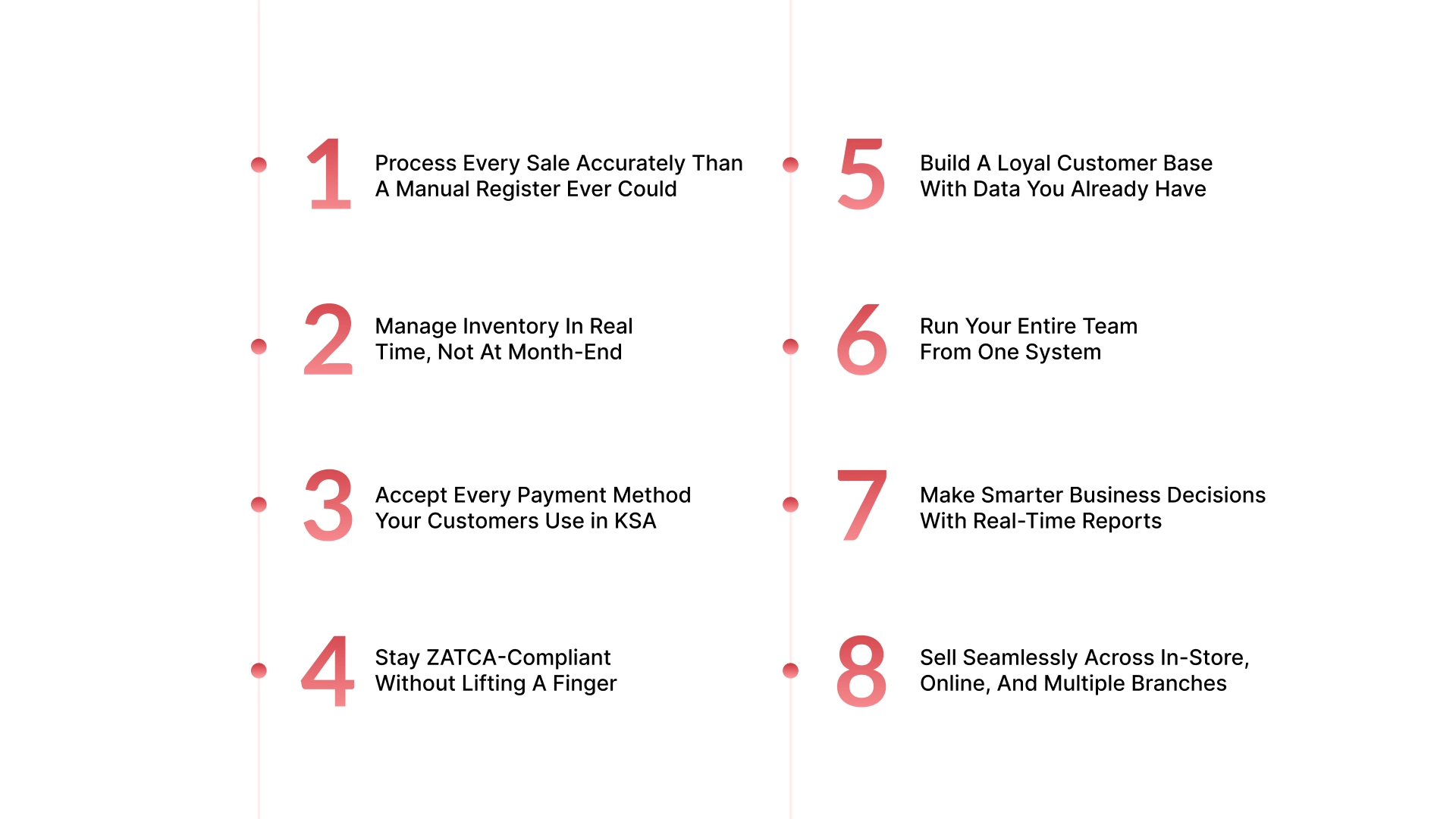
يقوم نظام نقاط البيع (POS) بأكثر من مجرد تسجيل عمليات البيع. إليك كيفية استخدام نظام POS لأعمال التجزئة:
الطوابير الطويلة تكلفك مبيعات، وعمليات الدفع البطيئة تُحبط العملاء. وهنا يأتي دور نظام POS في حل المشكلتين.
يقوم موظف الكاشير بمسح المنتج، فتظهر الأسعار وضريبة القيمة المضافة تلقائيًا، ثم يقوم العميل بالدفع عبر بطاقة مدى أو STC Pay، ويتم إصدار فاتورة متوافقة مع ZATCA خلال ثوانٍ.
إذا كان هناك خصم، يطبقه النظام فورًا. وإذا أراد العميل إيصالًا رقميًا، يُرسل مباشرة إلى بريده الإلكتروني.
والأهم من ذلك، أن كل عملية بيع مكتملة تُحدّث المخزون تلقائيًا وتُسجل الإيرادات في حساباتك المالية.
نفاد المخزون والتكدس الزائد من أكثر المشاكل تكلفة في قطاع التجزئة، وغالبًا ما تحدث بسبب تأخر المعلومات.
يقوم نظام POS المتصل بإدارة المخزون بتحديث الكميات مع كل عملية بيع أو استرجاع أو استبدال. وعندما يصل المنتج إلى حد إعادة الطلب، ينبهك النظام أو ينشئ أمر شراء تلقائيًا.
بدلًا من اكتشاف المشاكل في نهاية الشهر، تبدأ بمنعها بشكل يومي.
وبالنسبة للشركات الصغيرة والمتوسطة التي تدير عدة خطوط منتجات، يمنحك النظام رؤية واضحة للمنتجات الأسرع مبيعًا والمنتجات الراكدة. كما يمكنك إجراء تحليل ABC لترتيب المنتجات حسب سرعة المبيعات واتخاذ قرارات شراء أكثر ذكاءً وتحرير السيولة المجمدة في المخزون البطيء.
أما إذا كان لديك عدة فروع، فيمكنك رؤية مخزون جميع المواقع من لوحة تحكم واحدة وفي الوقت الفعلي.
عملاؤك يستخدمون وسائل دفع مختلفة، ويجب أن يواكبها نظام POS الحديث في السعودية، بما في ذلك:
النقد: مع احتساب الباقي وتتبع درج النقود تلقائيًا.
مدى: شبكة الدفع الوطنية في السعودية.
فيزا وماستركارد: لمعالجة البطاقات التقليدية.
Apple Pay وSTC Pay: للدفع عبر الجوال والدفع اللاتلامسي.
بطاقات الهدايا والرصيد المتجرّي: مع التتبع والاسترداد عند نقطة البيع.
الدفع المقسّم: عندما يدفع العميل جزءًا نقدًا وجزءًا بالبطاقة.
يتم تسجيل كل طريقة دفع تلقائيًا في النظام المالي، مما يجعل تسوية نهاية اليوم عملية سريعة بدلًا من أن تستغرق ساعات.
تُعد هذه من أكثر الوظائف أهمية لنظام POS بالنسبة لتجار التجزئة في السعودية عام 2026.
تتطلب المرحلة الثانية من الفوترة الإلكترونية لدى ZATCA إصدار فاتورة إلكترونية موقعة تشفيريًا وإرسالها إلى منصة فاتورة بشكل فوري لكل معاملة B2B.
بالنسبة لمتاجر التجزئة ذات الحجم الكبير، تنفيذ ذلك يدويًا يكاد يكون مستحيلًا.
يقوم نظام POS المدمج مع ZATCA بتنفيذ العملية بالكامل مباشرة عند نقطة البيع من خلال:
تطبيق نسبة ضريبة القيمة المضافة الصحيحة حسب فئة المنتج.
إنشاء فاتورة XML متوافقة مع رمز QR.
المزامنة التلقائية مع بوابة ZATCA.
حفظ جميع سجلات الفواتير لأغراض التدقيق.
وفي نهاية كل فترة ضريبية، يحصل فريق الحسابات على تقارير ضريبية جاهزة دون إدخال بيانات يدوي أو فجوات امتثال.
كل عملية بيع هي فرصة لفهم عميلك بشكل أفضل، لكن الكثير من المتاجر تهدر هذه المعلومات.
يقوم نظام POS بجمع بيانات العملاء أثناء الدفع، مثل معلومات الاتصال، وسجل المشتريات، وطريقة الدفع المفضلة، ومتوسط قيمة السلة الشرائية. ومع الوقت، تتحول هذه البيانات إلى ملف CRM فعّال يمكن لفريقك استخدامه.
وباستخدام هذه البيانات يمكنك:
تشغيل برامج ولاء يتم فيها احتساب النقاط واستبدالها تلقائيًا.
إرسال عروض مخصصة للعملاء الذين اشتروا منتجات معينة.
تحديد أفضل 20٪ من العملاء والتعامل معهم بشكل مختلف.
التواصل مع العملاء الذين لم يشتروا منذ 60 يومًا.
وبالنسبة للشركات التي تتعامل أيضًا مع حسابات تجارية أو مقاولين، تساعد وظيفة CRM فريق المبيعات في تتبع الحسابات واكتشاف فرص البيع الإضافي بسهولة.
إدارة الموظفين يدويًا، وتتبع الدوام عبر الأوراق، واحتساب العمولات يدويًا، ومتابعة الموافقات يستهلك وقت الإدارة ويزيد الأخطاء.
يوفر نظام POS المزود بأدوات إدارة الموظفين ما يلي:
صلاحيات حسب الدور الوظيفي: الكاشير يرى ما يحتاجه فقط، والمدير يرى كل شيء، والإدارة تتحكم بالنظام بالكامل.
تتبع الحضور والورديات: يتم تسجيل الدخول والخروج تلقائيًا.
تقارير أداء المبيعات حسب الموظف: لمعرفة من يحقق النتائج ومن لا يحققها ولماذا.
احتساب العمولات تلقائيًا: حسب المبيعات أو المنتجات أو الأهداف.
سجل موافقات المشرفين: يتم تسجيل كل عملية إلغاء أو استرجاع أو خصم مع الوقت واسم الموظف.
وهذه النقطة الأخيرة مهمة جدًا، لأن الفاقد الداخلي الناتج عن السرقة أو الأخطاء يُعد من أبرز أسباب اختلافات المخزون، بينما يساعد سجل التدقيق في اكتشاف الأنماط مبكرًا.
الاعتماد على الحدس ليس استراتيجية عمل، لكن معظم شركات التجزئة الصغيرة والمتوسطة لا تمتلك وصولًا سهلًا للبيانات اللازمة لاتخاذ قرارات دقيقة.
يوفر نظام POS تقارير تجيب عن الأسئلة المهمة فعليًا، مثل:
ما هي المنتجات الأكثر مبيعًا هذا الأسبوع؟ وأيها بالكاد تحرك؟
ما أكثر أوقات اليوم ازدحامًا؟ ومتى تحتاج إلى موظفين إضافيين؟
أي الفروع يحقق أداءً أفضل؟ وأيها يتراجع؟
ما متوسط قيمة السلة الشرائية؟ وكيف تغير خلال آخر 90 يومًا؟
أي العروض حققت مبيعات فعلية، وأيها فقط خفض هامش الربح؟
وعند ربط POS مع ERP، تنتقل هذه البيانات مباشرة إلى لوحات التحكم الخاصة بالأعمال، لتحصل على رؤية موحدة وفورية لكل عملياتك.
هنا يتحول نظام POS المتكامل إلى محرك نمو حقيقي.
إذا كنت تبيع داخل المتجر وعبر الإنترنت، يجب أن يعكس نظام POS نفس بيانات المخزون في جميع القنوات بشكل فوري.
فعندما يشتري عميل آخر قطعة متوفرة عبر الإنترنت، لا ينبغي أن يتمكن موظف المتجر من بيعها بعد دقائق. هذا النوع من الأخطاء يسبب فقدان العملاء وتعقيد عمليات الإرجاع.
كما يدعم النظام الموحد ما يلي:
الشراء عبر الإنترنت والاستلام من المتجر (BOPIS): حيث يرى الكاشير الطلب ويؤكد الاستلام ويغلق العملية بسهولة.
الممر غير المحدود (Endless Aisle): يمكن للموظف بيع منتجات موجودة بالمستودع حتى لو لم تكن معروضة بالمتجر.
الرؤية الموحدة للفروع: إذا انخفض المخزون في أحد الفروع، يمكنك معرفة الفرع الذي يمتلك الكمية وتحويلها مباشرة دون مكالمات أو تأخير.
ويتم دمج جميع المبيعات، سواء عبر الإنترنت أو داخل المتاجر أو بين الفروع، في رؤية مالية موحدة داخل نظام ERP، دون الحاجة للتوفيق بين عدة أنظمة مختلفة في نهاية الشهر.
توضح هذه الاستخدامات كيف يدير نظام POS العمليات اليومية، لكن لماذا أصبح ضروريًا لكل أعمال التجزئة في السعودية اليوم؟

يتحرك سوق التجزئة في السعودية بسرعة. إذا كنت لا تزال تعتمد على سجل نقدي تقليدي، أو جدول بيانات مشترك، أو تطبيق محاسبة غير متكامل، فأنت لا تعاني فقط من عدم الكفاءة، بل قد تكون بالفعل غير متوافق مع المتطلبات التنظيمية.
إليك ما يدفع هذه الحاجة الملحة لدى شركات التجزئة الصغيرة والمتوسطة في عام 2026:
تتطلب المرحلة الثانية من الفوترة الإلكترونية لدى هيئة الزكاة والضريبة والجمارك (ZATCA)، والتي تم تطبيقها على مراحل منذ عام 2023، أن تقوم أنظمة نقاط البيع (POS) بإنشاء فواتير بصيغة XML وPDF-A3 تحتوي على رموز QR وتوقيع تشفيري، بالإضافة إلى التكامل عبر واجهات برمجة التطبيقات (API) مع خوادم الهيئة لإتمام عمليات المطابقة في معاملات B2B والإبلاغ الفوري في B2C.
تُعرّض الأنظمة اليدوية غير المتوافقة أصحابها لمخاطر الغرامات، مما يجعل أنظمة POS المعتمدة من ZATCA ضرورية لجميع تجار التجزئة المسجلين في ضريبة القيمة المضافة (الإيرادات السنوية التي تتجاوز 375,000 ريال سعودي). وهذا يضمن معالجة دقيقة لضريبة القيمة المضافة وتخزينًا آمنًا للبيانات.
تهدف رؤية السعودية 2030 إلى الوصول إلى 70٪ من معاملات التجزئة بدون نقد بحلول عام 2030، مع نمو المدفوعات الرقمية بنسبة 47٪ على أساس سنوي في عام 2024، وانخفاض استخدام النقد إلى 21٪. تدعم أجهزة نقاط البيع (POS) البطاقات، والمحافظ الرقمية، ووسائل الدفع اللاتلامسية، بما يتماشى مع التحول الرقمي في القطاع العام بحلول عام 2025.
تقوم أنظمة POS الحديثة بأتمتة عمليات الفوترة، وتتبع المخزون، وإدارة الفروع المتعددة في الوقت الفعلي عبر تقنيات السحابة، مما يقلل الأخطاء ونفاد المخزون. كما توفر ميزات مثل إدارة علاقات العملاء (CRM)، والتحليلات، والتقارير رؤى مبيعات تدعم اتخاذ قرارات مبنية على البيانات. وهذا يعزز سرعة الدفع، وولاء العملاء، وقابلية التوسع لسلاسل التجزئة المتنامية.
إذا لم يكن لديك نظام POS اليوم، فأنت على الأرجح تواجه ما يلي:
عدم تطابق النقد في نهاية اليوم مع إجمالي المبيعات
جرد مخزون يستغرق أيامًا ولا يزال غير دقيق
غياب رؤية واضحة للمنتجات الأكثر ربحية
بيانات العملاء محفوظة في دفاتر أو هواتف أفراد
هذه ليست مجرد إزعاجات بسيطة، بل نقاط عمياء تشغيلية تكلفك المال أسبوعيًا.
ولهذا فإن اختيار نوع نظام POS المناسب لا يقل أهمية. ليس كل حل يناسب كل نشاط تجاري.
أنواع أنظمة نقاط البيع: أيها يناسب عملك؟
ليست جميع أنظمة POS متشابهة، وليست كل الأعمال لها نفس الاحتياجات. قبل الاختيار، من المهم فهم الخيارات المتاحة:
نظام POS التقليدي (المحلي / On-Premise): مناسب للمتاجر ذات الحجم الكبير التي تحتاج إلى عمل مستمر بدون اتصال إنترنت ولديها إعدادات مستقرة. لكن عيبه أنه يتطلب تكلفة أولية عالية، وتحديثات يدوية للبرامج، ولا يوفر وصولًا عن بعد للبيانات.
نظام POS السحابي (Cloud-Based): الخيار الأكثر شيوعًا للشركات الصغيرة والمتوسطة. يتم تخزين البيانات في السحابة، وتتم التحديثات تلقائيًا، ويمكنك متابعة المبيعات من أي مكان. معظم تجار التجزئة عالميًا اعتمدوا هذا النوع في عام 2025، والاتجاه مستمر في الارتفاع.
نظام POS المحمول (mPOS): يعمل عبر جهاز لوحي أو هاتف، ومناسب للمتاجر المؤقتة، والفعاليات، وفرق التوصيل، والاستلام من السيارة. يتميز بالمرونة والخفة، لكنه محدود من حيث الوظائف الإدارية المتقدمة.
نظام POS المدمج مع ERP: الخيار الأنسب للشركات الصغيرة والمتوسطة التي تدير عمليات تجزئة أو تجارة أو توريد على نطاق مهم. هذا ليس مجرد نظام بيع، بل كل عملية بيع يتم تنفيذها تُحدث المخزون تلقائيًا، وتُسجل في الحسابات، وتُصدر فاتورة ضريبية متوافقة، وتُسجل بيانات العميل—all في الوقت الفعلي داخل نظام واحد موحد.
اقرأ أيضًا: تكامل نظام ERP مع POS: الفوائد والعملية
بالنسبة للشركات الصغيرة والمتوسطة في قطاع التجزئة في السعودية التي تجاوزت الأدوات الأساسية وتحتاج إلى نظام POS وERP والامتثال لمتطلبات ZATCA ليعملوا كنظام واحد مترابط، فإن HAL مصمم خصيصًا لهذا النوع من الأعمال، حيث يجمع بين نظام نقاط البيع (POS) ونظام ERP كامل مصمم لسوق السعودية.
تشغيل نشاط تجزئة في السعودية عام 2026 يعني إدارة عدد أكبر من العناصر المتحركة أكثر من أي وقت مضى: الامتثال لضريبة القيمة المضافة، العمليات متعددة الفروع، إدارة المخزون في الوقت الفعلي، ولاء العملاء، وإدارة الموظفين.
تجمع HAL كل هذه الوظائف في منصة واحدة، مصممة خصيصًا للشركات الصغيرة والمتوسطة في السعودية في قطاعات التجزئة، والتجارة، والمقاولات، والخدمات.
إليك ما نقدمه لشركات التجزئة:
نظام نقاط البيع (Retail POS): عمليات دفع سريعة وسهلة تدعم جميع وسائل الدفع في السعودية، بما في ذلك مدى، وSTC Pay، وApple Pay، والدفع اللاتلامسي.
إدارة المخزون في الوقت الفعلي: يتم تحديث المخزون تلقائيًا مع كل عملية بيع أو إرجاع أو تحويل بين الفروع.
الفوترة الإلكترونية المتوافقة مع ZATCA (المرحلة الثانية): متوافقة بالكامل ومضمنة مباشرة داخل نظام POS دون الحاجة لأي حلول خارجية.
تكامل مع نظام ERP: تنتقل كل معاملة تلقائيًا إلى وحدات المشتريات، والحسابات، وإدارة علاقات العملاء (CRM).
دعم تعدد الفروع: إدارة التسعير، والمخزون، والتقارير عبر جميع مواقعك من لوحة تحكم واحدة.
إدارة الموظفين: الأدوار، والصلاحيات، وتتبع الوقت، واحتساب العمولات في مكان واحد.
واجهة باللغتين العربية والإنجليزية: مصممة من البداية لفرق العمل في السعودية.
وضع عدم الاتصال: يستمر نظام POS في العمل حتى عند انقطاع الإنترنت، ثم تتم المزامنة تلقائيًا عند عودة الاتصال.
HAL ليس أداة تجزئة عامة تم تعديلها للسوق السعودي، بل تم بناؤه لهذا السوق تحديدًا، مع مراعاة متطلبات الامتثال، وهياكل الأعمال، والتعقيد التشغيلي الذي تواجهه شركات التجزئة الصغيرة والمتوسطة في السعودية فعليًا.
ولرؤية كيف يعمل ذلك في سيناريو واقعي، دعنا نلقي نظرة على كيفية تحول شركة تجزئة نامية في السعودية باستخدام نظام POS وERP متكامل.
شركة Coastline LLC، ومقرها في مدينة الملك عبد الله الاقتصادية (KAEC)، تدير مقاهي، ومتاجر تجزئة، وخدمات ترفيهية عبر 17 موقعًا. قبل استخدام HAL، كانت الشركة تعتمد على عدة أنظمة نقاط بيع (POS) غير مترابطة، دون وجود تقارير موحدة أو رؤية مركزية.
قامت Coastline بالشراكة مع نظام HAL ERP بدمج نظام POS الخاص بها عبر جميع الفروع الـ17 في نظام واحد موحد. قام HAL بأتمتة تدفق البيانات بالكامل من نظام نقاط البيع إلى نظام ERP، مما ألغى الحاجة إلى الإدخال اليدوي بشكل كامل. كما تم التعامل مع الامتثال لمتطلبات ZATCA من خلال تكامل مباشر داخل منصة HAL، بما في ذلك التوقيعات التشفيرية، وتوليد رموز QR، ومعالجة ملفات XML بشكل تلقائي.
النتائج:
مزامنة البيانات في الوقت الفعلي عبر جميع الفروع الـ17
امتثال كامل للمرحلة الثانية من ZATCA دون أي تدخل يدوي
تقارير أسرع بشكل كبير وسرعة أعلى في اتخاذ القرارات
انتقلت Coastline من تأخر في البيانات يصل إلى شهر كامل إلى رؤية فورية لجميع العمليات في كل موقع.
فهم كيفية استخدام نظام نقاط البيع (POS) لأعمال التجزئة يتجاوز مجرد معالجة عمليات البيع. إنه يتعلق بتحويل كل عملية بيع إلى بيانات منظمة وفي الوقت الفعلي، تقوم تلقائيًا بتحديث مستويات المخزون، والسجلات المالية، وتقارير الامتثال.
هذا بالضبط ما تبرزه الطرق الثمانية في هذا الدليل: كيفية استخدام نظام POS في قطاع التجزئة لإلغاء العمل اليدوي، وتقليل الأخطاء، وإنشاء عمليات أكثر ترابطًا، بحيث يتمكن فريقك من التركيز على العملاء بدلًا من الجداول اليدوية.
إذا كنت من شركات التجزئة أو التجارة أو المقاولات في السعودية وتبحث عن نظام POS يقوم بأكثر من معالجة المدفوعات، فإن HAL يقدم لك نظامًا متكاملًا ومتوافقًا مع ZATCA يربط نقطة البيع بجميع عمليات عملك، دون تعقيد إدارة عدة أدوات.
تواصل مع فريق HAL اليوم للحصول على استشارة مجانية وعرض سعر مخصص لعملك.
ما هو أفضل نظام POS للتجزئة في السعودية؟
يعتمد الاختيار الصحيح على احتياجاتك. في السعودية، يجب التركيز على الامتثال لـ ZATCA، والواجهة باللغة العربية، والتكامل مع ERP، والدعم المحلي. بالنسبة للشركات الصغيرة والمتوسطة التي تحتاج إلى حل شامل ومتوافق، يبرز HAL Simplify كمنصة مصممة خصيصًا لتوحيد عمليات التجزئة، وضمان الامتثال السلس لمتطلبات ZATCA، ودعم النمو القابل للتوسع.
هل نظام POS ضروري للامتثال لـ ZATCA في السعودية؟
نعم، نظام POS أو نظام الفوترة الإلكترونية المتوافق ضروري للامتثال لمتطلبات ZATCA. يجب على الشركات إصدار فواتير إلكترونية تحتوي على الحقول المطلوبة ورموز QR وإرسالها بشكل صحيح. يضمن نظام POS أن معاملات التجزئة تلتزم بهذه المتطلبات بكفاءة ويقلل من مخاطر عدم الامتثال.
ما الفرق بين نظام POS ونظام ERP؟
نظام POS يدير عمليات البيع الأمامية مثل الفوترة والمدفوعات، بينما نظام ERP يدير العمليات الخلفية مثل المحاسبة، والمشتريات، والموارد البشرية. يضمن التكامل بين النظامين تدفق البيانات بسلاسة، مما يوفر رؤية شاملة للمبيعات والمخزون والعمليات المالية.
هل يمكن لنظام POS العمل بدون إنترنت في السعودية؟
نعم، العديد من أنظمة POS توفر وظيفة العمل دون اتصال بالإنترنت، مما يسمح باستمرار عمليات البيع وتسجيل المعاملات. يتم تخزين البيانات محليًا ثم مزامنتها لاحقًا. ومع ذلك، يتطلب الامتثال لـ ZATCA في النهاية اتصالًا بالإنترنت لإرسال التقارير والمعاملات.
هل أحتاج إلى نظام محاسبة منفصل إذا كان لدي POS؟
إذا كان نظام POS لديك مدمجًا مع ERP، فلن تحتاج إلى نظام محاسبة منفصل. يتم تسجيل كل عملية بيع أو إرجاع أو دفع تلقائيًا في دفتر الأستاذ العام، ويتم إنشاء تقارير الأرباح والخسائر وضريبة القيمة المضافة والتدفقات النقدية دون إدخال يدوي. أما إذا كان نظام POS مستقلًا، فستحتاج إلى نظام محاسبة منفصل مع تسوية يدوية بينهما.
هل يمكن لنظام POS إدارة عدة فروع من مكان واحد؟
نعم، بشرط أن يكون النظام مصممًا لدعم العمليات متعددة الفروع. يمكنك إدارة الأسعار والمخزون والعروض والموظفين عبر جميع الفروع من لوحة تحكم مركزية واحدة. ويتم دمج بيانات المبيعات لكل فرع في تقارير مالية موحدة، مما يمنحك رؤية كاملة لنشاط عملك بدلًا من بيانات مجزأة لكل فرع.